These instructions apply to the Chrysler 300 Mk1 (LX) 2004-2011.
For other models, please choose your vehicle here.
If your automatic Chrysler 300 / 300C (LX, 2004–2011) is stuck in Park and the gear selector won’t move — usually because of a flat 12 V battery, a blown fuse or a shift-interlock fault — you can release it manually so the car can be rolled or loaded onto a recovery truck. This guide shows the shift-lock override (NAG1 5-speed automatic). It is a recovery step, not a repair.
When You Need This
The automatic 300C locks the selector in P until the car has power, your foot is on the brake and the electronics release the shift-lock. If the battery is dead or a fault prevents that, the lever stays in P. The manual override frees the selector so you can select neutral.
Safety First
- Apply the parking brake or chock the wheels before releasing — the car can roll once it is in neutral.
- Work on level ground, or with the car already secured on a recovery vehicle.
How to Release the 300C from Park
- Turn the ignition on — do not start the engine.
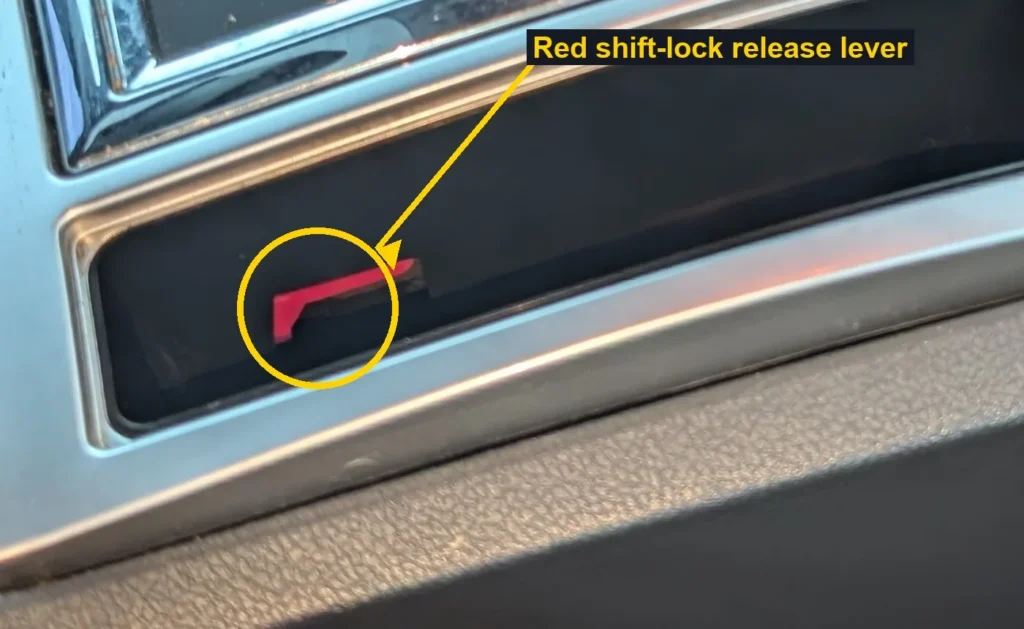
- Remove the storage compartment ahead of / beside the gear selector to reach the override (it lifts out).
- Press the red shift-lock release lever in the opening.
- With it held, move the gear lever out of P into N.
- Release the button and refit the storage compartment.
With the car in neutral it can be rolled or winched — keep it braked or chocked until it is secured.
After the Emergency Release
This only frees the car — it does not fix the cause. The most common reason is a flat or failing 12 V battery; once power is restored the selector works normally. See our 300C battery guide if that was the cause. If the battery is healthy but it keeps sticking, a fault will be stored — look it up on autodtcs.com.
Frequently Asked Questions
Why is my automatic 300C stuck in Park?
Almost always a flat 12 V battery or a blown fuse that stops the shift-lock releasing. A brake-light switch or selector fault can do the same.
Will I damage anything using the override?
No — the shift-lock override is designed for exactly this situation. Operate it gently and refit the trim afterwards.
Where is the override on the 300C?
Under the storage compartment by the gear selector — lift the cubby out and press the red release lever in the opening.
The lever moves but the car won’t roll — why?
Make sure you reached neutral, the parking brake is released and the wheels are unchocked once you are ready to move it.
To clear the oil-change reminder after related work, see our Chrysler 300 oil-change indicator reset guide.
Independent guide — not affiliated with Chrysler. Always follow your official service manual and safety precautions. Read our full disclaimer.