These instructions apply to the Ford F-150 Mk14 (P702) 2021-present.
For other models, please choose your vehicle here.
The 14th-generation Ford F-150 (P702, 2021 onward) tracks oil life with the Intelligent Oil-Life Monitor and shows an “Oil Change Required” message when service is due. After you change the oil, clear the reminder yourself from the instrument-cluster menu with the steering-wheel buttons — no dealer scan tool.
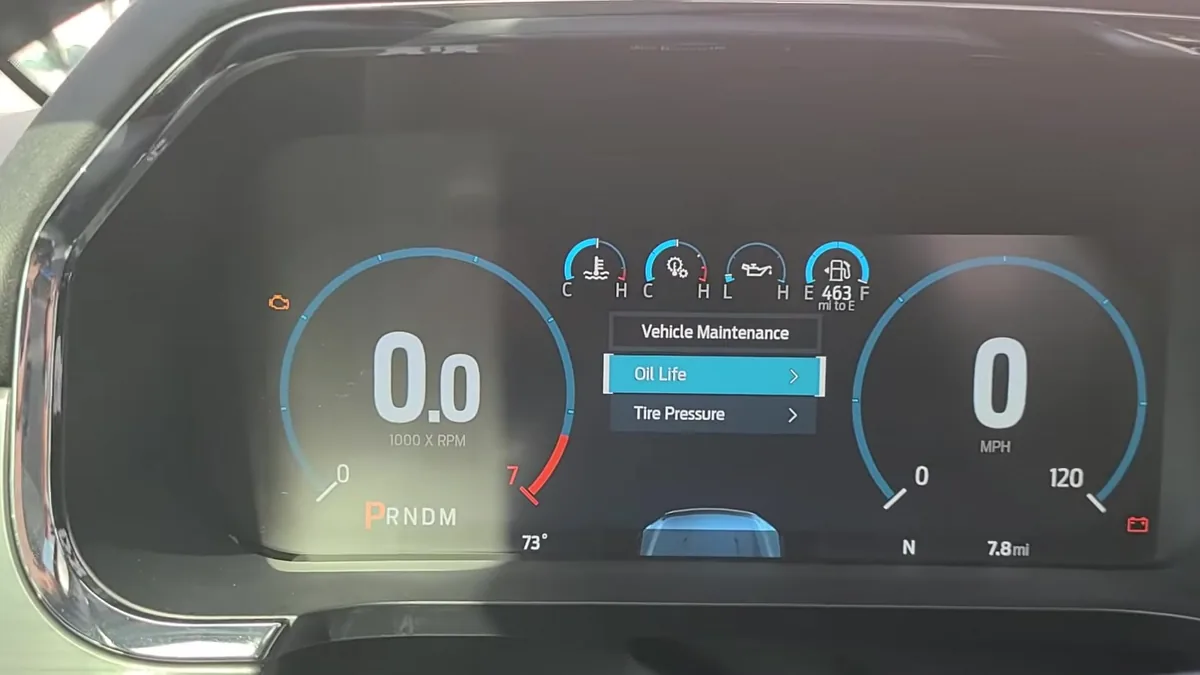
- Switch the ignition on with the engine off, then press the Menu button on the steering wheel to open the cluster main menu.
- Select Truck Info.
- Select Oil Life.
- Select Reset Oil Life.
- Press and hold OK until the reset confirmation appears and the oil life returns to 100%.
Frequently asked questions
My truck has the big 12-inch digital cluster — where is it?
On the 8-inch / 12-inch productivity screen the path is Menu → Settings → Vehicle Maintenance → Oil Life, then press and hold OK. The 4.2-inch cluster uses the Truck Info route above.
The “Oil Change Required” message came back — why?
The reset didn’t complete. Set the ignition on with the engine off, return to Oil Life, and hold OK until the confirmation clearly shows before driving.
Do I reset it after every oil change?
Yes. The Intelligent Oil-Life Monitor is algorithm-based, not a fixed mileage countdown — it only starts a fresh interval once reset.
If an oil-pressure or maintenance warning light is also on, scan for stored codes first — you can look them up on autodtcs.com before clearing anything.
Independent guide — not affiliated with Ford. Always follow your official service manual and safety precautions. Read our full disclaimer.