These instructions apply to the Honda Civic Mk10 (FK) 2016-2021.
For other models, please choose your vehicle here.
Disconnecting the 12 V battery on a Honda Civic Mk10 (FK, 2016–2021) is a straightforward engine-bay job you might do when renewing the battery, isolating the power for electrical or bodywork repairs, laying the car up for a while, or recovering after a jump-start. Honda asks for a short wait before you pull the leads so the control units power down cleanly, and a couple of things relearn once power is back. Here’s the safe sequence, in the right order, so the Civic settles without drama.
Where the 12 V Battery Is
The 12 V battery sits in the engine compartment, under a cover. Lift the cover away and you’ll see the two terminals: the negative (−) lead is black and marked with a minus symbol, and the positive (+) lead is red under a coloured flap. There’s only the one battery to find on the Civic Mk10.
Before You Start
- Switch the ignition fully off and remove the key (or keep a keyless fob out of range).
- Turn off the lights, climate and radio, and close the doors.
- Note the clock, your radio presets, and any radio security code from your handbook wallet just in case.
- Give the control units the wait below to power down before you touch the terminals.
- Have the correct spanner ready, and wear gloves and eye protection.
Disconnecting
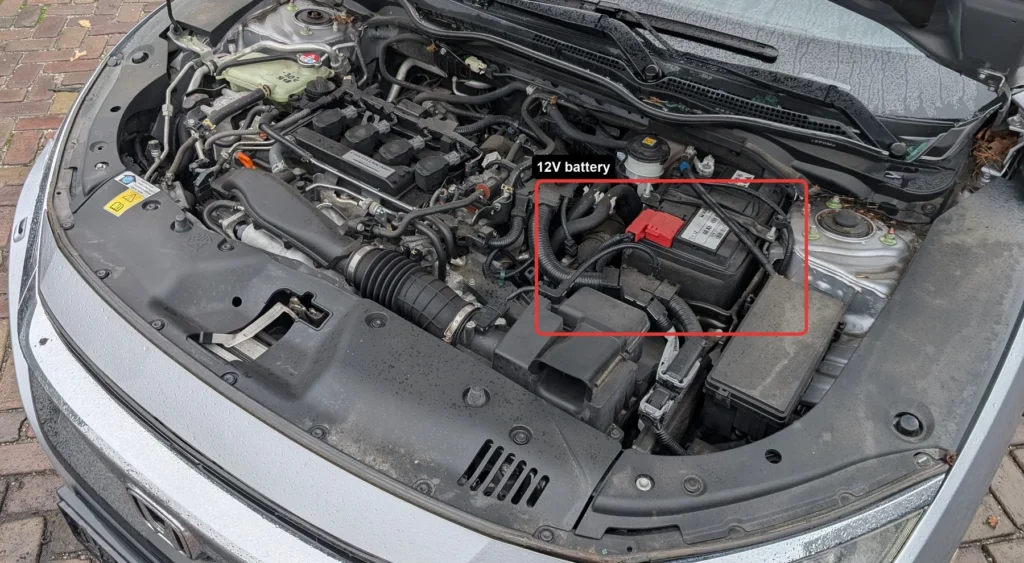
- Switch the ignition off and remove the key (or keep a keyless fob out of range).
- Wait 3 minutes after switching off before disconnecting.
- Disconnect the negative (−, black) terminal first and lift the lead clear, tucking it aside so it can’t drop back onto the post.
- If you’re removing the battery, disconnect the positive (+, red) next, then release the hold-down and lift the battery out level.
Airbag/pretensioner safety: if you’ll be near airbags or seat-belt pretensioners, allow the system to discharge for the 3 minutes before going further.
Reconnecting & Relearning
- Reconnect positive (+) first, then negative (−) last; clean and lightly grease the terminals, tighten and refit the cover.
- Reset the clock and re-enter your radio presets (and the security code if the unit asks for one).
- The engine may idle slightly rough at first — the idle relearns over the first few minutes of running and driving.
- Recalibrate the tyre-pressure (deflation) monitor — see our Civic Mk10 TPMS guide.
The Civic doesn’t need the 12 V battery coded, so a like-for-like swap is fit-and-go once the idle has settled and the deflation monitor is reset. Check your one-touch windows too — if auto-up drops out, work each window fully up and hold briefly to re-teach it.
If a Warning Light Stays On or the Car Feels Off
- Check both terminal clamps are properly tight — a loose earth is a frequent cause of odd faults.
- Let the car relearn over a short drive; the idle smooths out and the deflation-monitor light clears once reset and driven.
- If the TPMS light stays on, re-do the recalibration from the guide above.
- Rule out a genuinely flat or aged battery if cranking was weak before this.
- Read any code that stays stored so you know what’s actually being flagged.
Frequently Asked Questions
Where is the Civic Mk10 battery?
In the engine compartment, under a cover. Lift the cover to reach the negative (−) and positive (+) terminals — there’s just the one 12 V battery on this Civic.
Which terminal first on the Civic?
Always the negative (−) first when disconnecting, and reconnect it last. That stops your spanner from shorting a live positive against the bodywork.
Why wait 3 minutes?
Honda wants the control units to power down fully so nothing is corrupted when the battery comes off. It also lets the airbag and pretensioner system discharge if you’ll be working nearby.
Will I lose my radio?
Older Civic units may ask for a code; the Mk10’s touchscreen usually doesn’t. Note any code in your handbook wallet just in case, and be ready to reset the clock and presets.
Does it need the battery registered?
No — the Civic doesn’t require coding. Reset the clock, relearn the idle by driving, and recalibrate the deflation monitor. A like-for-like battery is simply fitted.
Will disconnecting reset the service light?
No — the service reminder is a separate menu procedure and won’t clear from a battery disconnect. Any genuine stored fault will also return until it’s fixed.
For any warning light that stays on, look up the code on autodtcs.com. To clear the service reminder, see our Civic Mk10 service reset guide.
Independent guide — not affiliated with Honda. Always follow your official service manual and safety precautions. Read our full disclaimer.