These instructions apply to the Honda Civic Mk10 (FK) 2016-2021.
For other models, please choose your vehicle here.
If the touchscreen in your Honda Civic (Mk10/FK/FC, 2016–2021) has frozen, gone black, or stopped responding — often while Apple CarPlay or Android Auto is connected — you can force the Display Audio unit to reboot yourself in under a minute, with no tools and no dealer visit.
Which screen the Mk10 Civic uses
The tenth-generation Civic uses Honda’s 7-inch Display Audio capacitive touchscreen. Pre-facelift cars (2016–2018) are the ones owners complained about most: there is no physical volume knob, just a touch slider, and the unit is well known for lag and freezes. Honda listened — the 2019 facelift reinstated a proper rotary volume knob, a genuine fix for the single biggest gripe of this generation. Either way, a frozen screen is a software lock-up: the engine, climate and safety systems keep working while only the display sticks. The reboot is held from the power/audio control.
Soft reset (reboot) the screen
Park with the engine running or ignition ON so the unit stays powered.
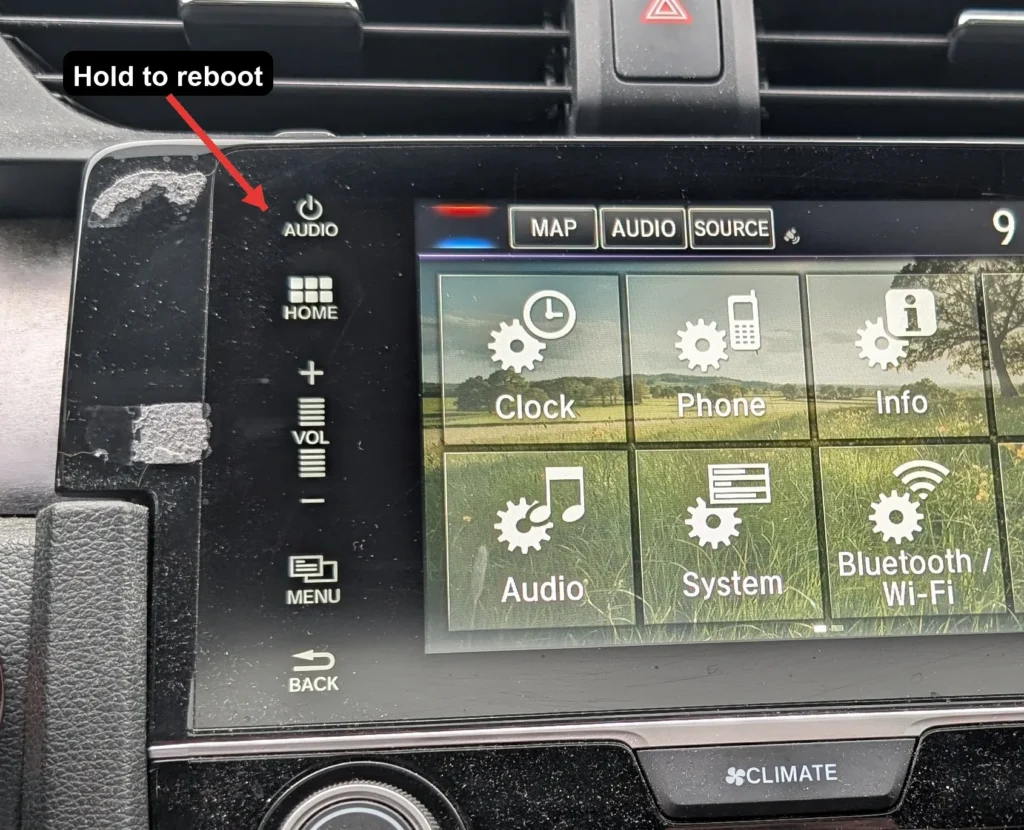
- On 2019–2021 facelift cars, press and hold the volume/power knob. On 2016–2018 cars without a knob, press and hold the Power button (or the audio Power touch control) instead.
- Keep holding for about 5–10 seconds.
- When the screen goes black and the Honda logo appears, the reboot has started.
- If a pop-up asks whether to reboot, choose Yes; otherwise just release.
- Allow 30–60 seconds for the home screen to reload before expecting touch and audio to respond.
Safe — it loses no data
This reboot is harmless. It does not delete radio presets, paired phones, call history or saved settings — the unit simply reloads its software, like restarting a phone. Repeat as often as needed.
If it stays frozen
- Hold longer. If a short hold did nothing, retry and hold the power/volume control for a full 20–40 seconds.
- Suspect CarPlay/Android Auto. Mk10 freezes very often track with a phone-projection session or a worn USB lead — unplug, delete the pairing on both devices, swap to a known-good Apple- or Android-certified cable and re-pair.
- Cycle the ignition fully. Switch off, open the door, lock the car and walk away for a couple of minutes so the module sleeps, then restart.
- Pull the audio fuse. With the car off, remove the head-unit fuse from the fuse box (check the lid diagram), wait around 15 seconds and refit it — this hard-cuts power when a button hold will not clear the lock.
Factory reset (erases data)
A factory reset is separate from the reboot and only worth doing if you are selling the car or chasing a stubborn glitch. On the touchscreen go to Home → Settings → System → Factory Data Reset and confirm. It wipes paired phones, call history, presets, navigation favourites and all personal settings back to factory defaults, so do it on purpose.
Frequently Asked Questions
My 2017 Civic has no volume knob — how do I reboot it?
Pre-facelift Mk10 cars use a touch volume slider, not a knob. Hold the Power button (or the audio Power touch control) for 5–10 seconds until the Honda logo appears. The knob only returned with the 2019 facelift.
Did Honda really add the volume knob back?
Yes. After widespread complaints about the touch-slider volume, the 2019 facelift Civic regained a physical rotary volume knob — on those cars you simply press and hold that knob to reboot.
Will rebooting lose my presets and paired phone?
No. The press-and-hold restart keeps every preset, favourite and pairing. Only the Factory Data Reset in the System menu clears them.
My screen only freezes with CarPlay — how do I stop it?
Use a different certified cable, delete and re-create the pairing, and keep the head-unit software up to date at a dealer. The Mk10 is particularly prone to CarPlay/Android Auto freezes, and a fresh cable plus re-pair fixes most cases.
Is it safe to drive with the screen frozen?
Yes. The Display Audio unit is independent of the engine and brakes — you only lose audio, phone and navigation. Reboot when safely parked.
If a warning light or fault message stays on the dash after the reboot, the car may have stored a diagnostic trouble code — you can look it up on autodtcs.com.
Independent guide — not affiliated with Honda. Always follow your official service manual and safety precautions. Read our full disclaimer.