These instructions apply to the Honda Civic Mk10 (FK) 2016-2021.
For other models, please choose your vehicle here.
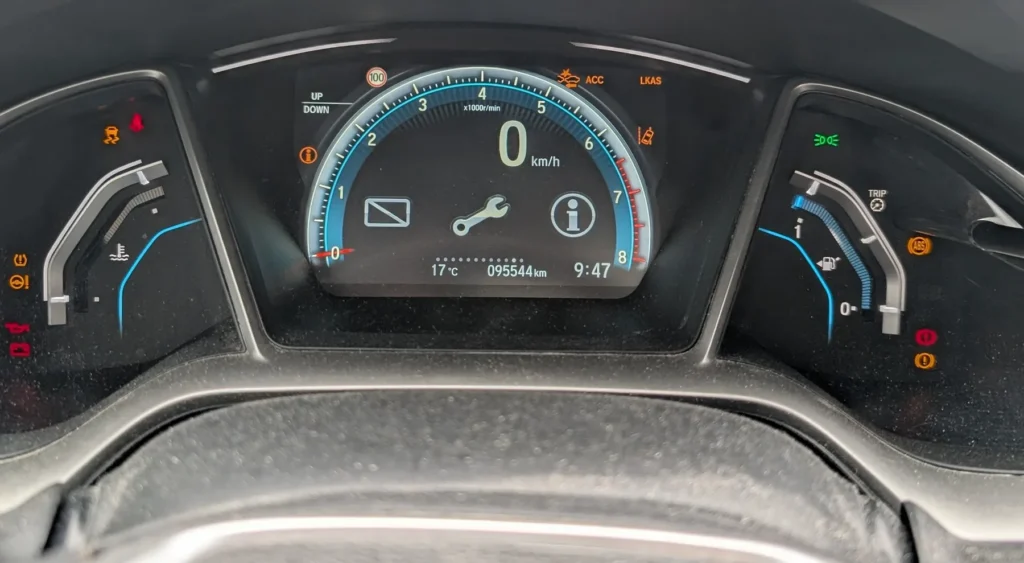
When the wrench/spanner symbol or an “A” service code appears on your Honda Civic Mk10 (FK, 2016–2021), the Maintenance Minder has counted the oil/service life down. You clear it yourself from the driver’s information display in a few steps. Here’s the method; do the service first.
What the Maintenance Minder Means on the Civic Mk10
Unlike a plain fixed-mileage reminder, the Civic Mk10 uses Honda’s Maintenance Minder: a condition-based system that estimates how much oil and service life is left rather than counting to a fixed number. It watches how the car is actually driven — engine temperature, revs, trip length and load — and works the remaining oil life down from 100% toward 0%. When it gets low you first see the oil-life percentage drop; when it reaches 15% the wrench symbol appears, and at 0% it reads as negative and the reminder becomes more insistent.
The wrench itself is not a fault. It is a scheduled-maintenance prompt, and it is paired with letter and number codes that tell you exactly what is due. Because the system is condition-based, two identical Civics driven differently will reach the reminder at different mileages, so there is no single figure to memorise — the display, and the schedule in your handbook, are the reference.
Understanding the A, B and 1–6 Service Codes
The Maintenance Minder pairs a main code (a letter) with one or more sub-codes (numbers):
- A — replace the engine oil.
- B — replace the engine oil and filter, plus inspect brakes, other fluids and running gear.
- 1–6 — individual sub-items such as tyre rotation, air/cabin filters, transmission fluid, brake fluid and so on.
So a display of “B1” means an oil-and-filter service with a tyre rotation, for example. Read the codes before you reset, because clearing the Minder also clears the list of what was outstanding.
Reset After the Service Only
Honda’s Maintenance Minder estimates remaining oil/service life. Resetting without doing the work tells the car the oil is fresh, so it’ll run past the safe point.
Getting Ready
Only reset after the service is genuinely done — at minimum the oil (and filter for a B service) changed, plus any sub-items the codes called for. Park on level ground, apply the parking brake, and switch the ignition on without starting the engine. You don’t need any tools; the reset lives in the steering-wheel menu.
How to Reset the Civic Mk10 Maintenance Minder
- Apply the parking brake and turn the ignition on (don’t start the engine).
- Press the ‘INFO’ button on the steering wheel repeatedly until the service spanner / maintenance display appears.
- Press ‘ENTER’ to select it, then press and hold ‘ENTER’ for at least 10 seconds.
- Select the service item shown (e.g. engine oil life) and press ‘ENTER’ to confirm.
- ‘Reset completed’ appears — the indicator returns to 100%.
On Civics without the steering-wheel menu, press the trip/display button to the mileage, hold it ~10 seconds until ‘—-’ appears, then hold again briefly to confirm.
What Happens Next
After a successful reset the oil life returns to 100% and the wrench symbol clears. The service codes disappear from the display, and the Maintenance Minder begins counting the new interval down from full based on how you drive. The next time you switch on, the wrench should stay off; if it does not, the reset did not confirm and you should repeat it.
If It Doesn’t Reset
- You didn’t hold ENTER long enough — the ~10-second hold is what opens the reset.
- A different warning is on — that’s a fault, not the Maintenance Minder, and won’t clear this way.
Two more things catch people out. First, make sure you selected the correct service item before holding — if several items are listed, each is reset in turn. Second, do the whole thing with the engine off; if the engine starts, the menu behaves differently and the hold may not register, so cycle the ignition off and on and start again.
How Often It Comes Up
Reset the Maintenance Minder once after each service, right after the work is completed. Because the system is condition-based rather than fixed-interval, you don’t reset it to a mileage — you simply clear it and let the car recalculate. Wait for the oil-life percentage to fall and the wrench to reappear before the next service, and follow the maintenance schedule in your handbook for the sub-items.
Frequently Asked Questions
What do the Honda service codes (A, B, 1–6) mean?
“A” is an oil change; “B” adds inspection items; the numbers are sub-items (tyres, brakes, fluids). The display tells you what’s due.
Do I need a diagnostic tool?
No — the reset is done from the INFO/ENTER buttons with the ignition on.
Does the engine need to run?
No — ignition on, engine off.
The wrench came back — why?
The reset didn’t confirm — repeat and hold ENTER until ‘Reset completed’ shows.
Why did the wrench appear before the oil looks old?
Because the Minder is condition-based. It estimates remaining life from how the car is driven and shows the wrench at around 15% remaining — a prompt to plan the service, not a sign the oil has already failed.
Can I reset just one item if several are listed?
Yes — the menu lets you select and confirm each service item individually, so you can reset only the ones you actually attended to.
If a warning light appeared with the service message, look it up on autodtcs.com. After battery work, see our Civic Mk10 battery guide.
Independent guide — not affiliated with Honda. Always follow your official service manual and safety precautions. Read our full disclaimer.