These instructions apply to the Honda Insight Mk2 (ZE2) 2009-2014.
For other models, please choose your vehicle here.
The Honda Insight (ZE2, 2009–2014) is a hybrid, but the battery you work on for a normal disconnect is the ordinary 12 V battery in the engine bay — not the high-voltage IMA pack. This guide covers the safe order for disconnecting and reconnecting the 12 V battery, and the one hybrid-specific warning to respect.
Hybrid safety first
The Insight’s Integrated Motor Assist (IMA) battery is a separate, sealed high-voltage system with orange cabling under the boot floor. Never touch, open or disconnect anything orange. All the jobs below involve only the standard 12 V battery under the bonnet, which is safe to handle like any other car battery.
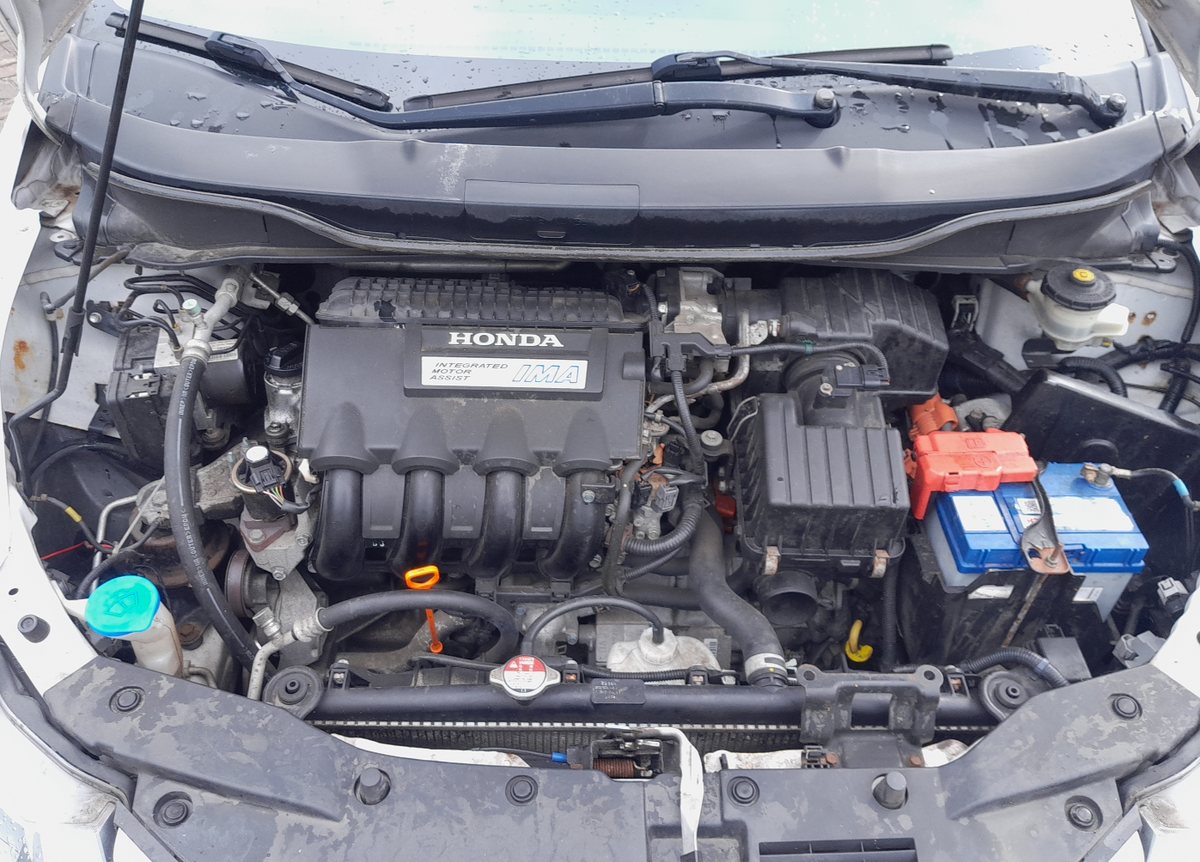
Where the 12 V battery is
It sits in the engine bay, on the right-hand side as you look in, with a red cover over the positive terminal. Lift the cover to reach the clamps.
Before you disconnect
- Check whether your audio needs a security code and have it ready.
- Note your presets, and the clock.
- Turn the ignition off and make sure the car is fully powered down (no ready light).
Disconnecting — correct order
- Slacken the clamp on the negative (−, earth) terminal first and lift the lead clear.
- Only undo the positive (+) terminal if you are removing the battery completely.
- If removing it, undo the hold-down clamp and lift the battery out upright.
Safety: if you will then work on or near the airbags or seat-belt pretensioners, wait at least 3 minutes after disconnecting the 12 V battery before touching those components, so the SRS back-up power discharges.
Reconnecting — correct order
- Refit the battery and secure the hold-down clamp.
- Connect the positive (+) lead first, then the negative (−) earth lead last, and tighten both.
- Turn the ignition on for a few seconds before starting.
What to reset afterwards
- Reset the clock and radio and re-enter presets.
- Re-initialise the power windows if one-touch stops working — see our window initialise guide.
- The IMA may briefly show reduced assist while it recalibrates — a normal drive restores it.
Frequently asked questions
Is it safe to disconnect the battery on a Honda Insight hybrid?
Yes — the under-bonnet 12 V battery is a standard battery and safe to disconnect. Just never touch the orange high-voltage IMA cabling, which is a separate sealed system.
Which terminal first?
Always the negative (−) first, and reconnect it last.
Will disconnecting harm the hybrid system?
No. The IMA has its own management; after reconnection it recalibrates over a short drive. You do not need special tools for a 12 V swap.
My gear lever won’t move out of P after a flat battery — help?
Use the shift-lock override — see our emergency park release guide.
Independent guide — not affiliated with Honda. Always follow your official service manual and safety precautions. Read our full disclaimer.