These instructions apply to the Honda Insight Mk2 (ZE2) 2009-2014.
For other models, please choose your vehicle here.
The OBD-II diagnostic socket on the Honda Insight (ZE2, 2009–2014) is where a code reader, scan tool or Bluetooth dongle plugs in to talk to the car’s computers — the first thing to find when a warning light appears. On the Insight it is under the dashboard on the driver’s side.
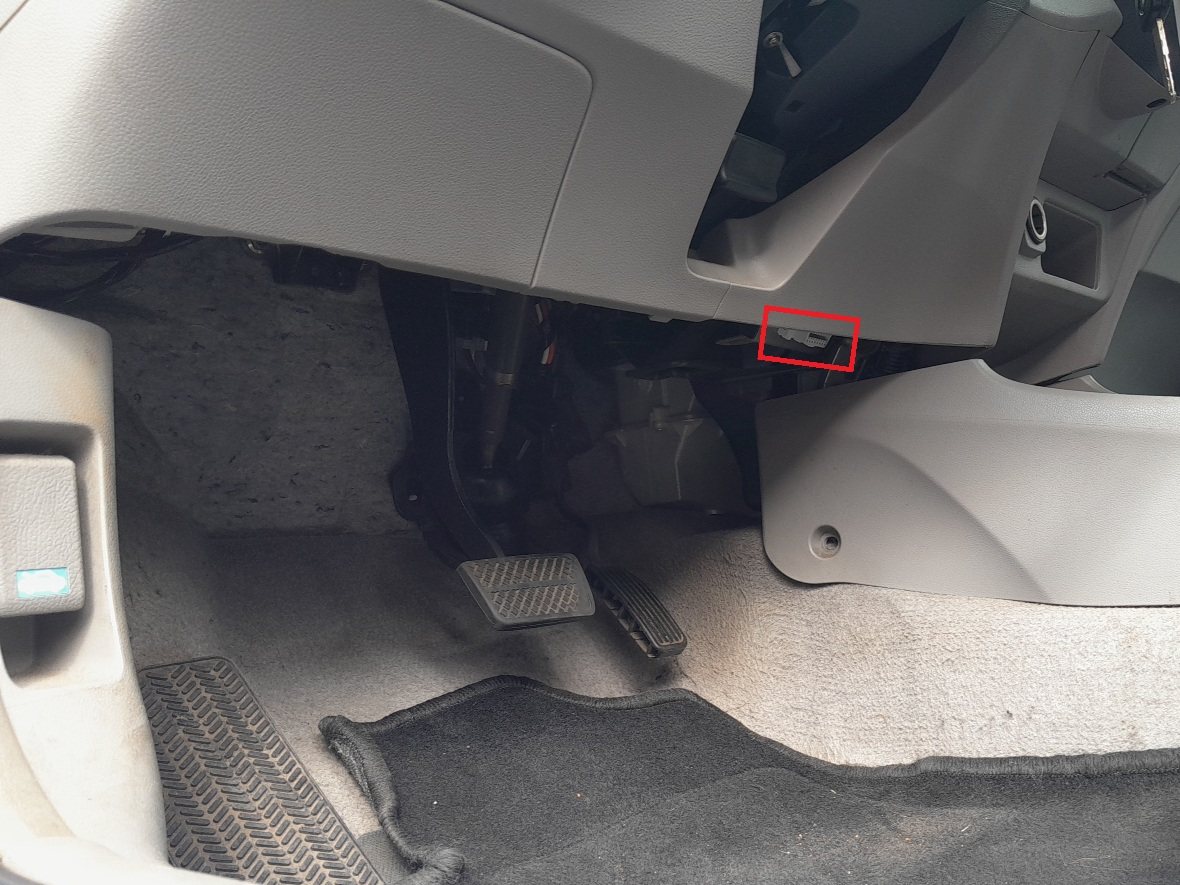
Where to find it
Sit in the driver’s seat and look under the dashboard, above the pedals, in the lower trim just to the right of the bonnet-release lever and left of the steering column. The 16-pin connector faces downwards in that recess; it is in shade, so a torch helps you line up the plug.
Using the port
- Make sure the ignition is off before plugging in.
- Push the tool’s plug firmly into the 16-pin socket — it only fits one way.
- Switch the ignition on (engine off) to read and clear codes; on a hybrid, put it in the ON/ready mode for live data.
- Unplug the tool afterwards — a dongle left in permanently adds a small parasitic drain.
What you can do with it
- Read and clear fault codes for the engine, ABS, airbag and, with a Honda-capable tool, the IMA hybrid system.
- Watch live data to trace a running fault.
- Check readiness monitors before an emissions test.
Frequently asked questions
Where is the OBD port on a Honda Insight?
Under the dash on the driver’s side, above the pedals, near the bonnet-release lever. The 16-pin socket faces down.
Can a generic reader see the hybrid (IMA) faults?
A generic OBD-II reader covers engine/emissions codes. For IMA hybrid and some body/ABS systems you need a Honda-capable scan tool.
Does the engine need to be running to read codes?
No — ignition on (engine off) powers the modules for reading and clearing. Start the engine only for live running data.
Will a plugged-in dongle flatten the battery?
Left in for days it can. Unplug it if the Insight is parked for a long spell.
Got a code? Decode it and find the likely fix on autodtcs.com. To clear a stored light after a repair, see our battery disconnect guide.
Independent guide — not affiliated with Honda. Always follow your official service manual and safety precautions. Read our full disclaimer.