These instructions apply to the Hyundai i20 Mk1 (PB) 2009-2014.
For other models, please choose your vehicle here.
If the remote on your Hyundai i20 Mk1 (PB, 2009–2014) has become weak — you have to stand close to lock or unlock, or it’s become unreliable — the fob’s coin cell needs replacing. The i20 key uses a CR2032 cell, and exactly how it sits depends on the key type. This guide covers both. It takes a couple of minutes with a small screwdriver.
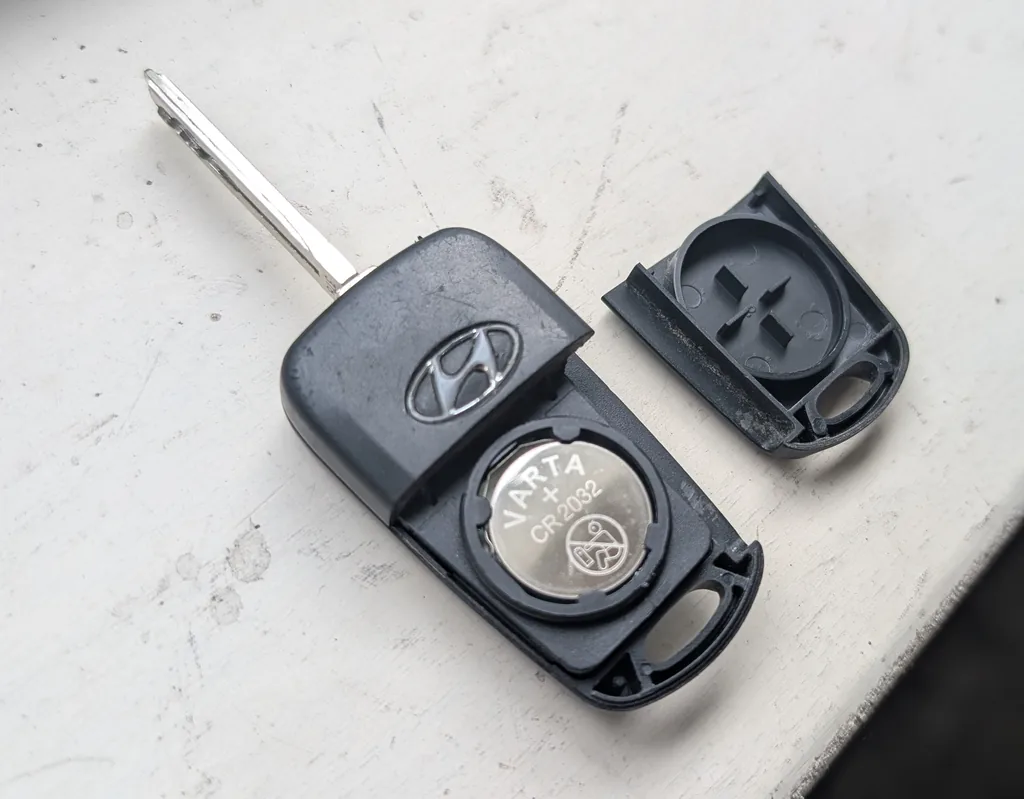
Replacing the Cell
Whether your i20 has the plip-style remote or the folding-blade key, it uses a single CR2032 3 V lithium coin cell, and it seats the same way. Hyundai’s own manual and this car agree — the positive (+) face points up.
- On the folding key, swing the metal blade out first. Insert a slim flat screwdriver into the case seam and gently prise the two halves apart to reach the cell.
- Note which way the old cell sits, then lift out the CR2032.
- Fit the new cell with the positive (+) symbol facing up, exactly as the old one sat.
- Clip the cases back together and check the remote locks and unlocks the car.
Does It Need Programming?
No — replacing the coin cell does not affect the fob’s pairing, so the key keeps working immediately. A lost or broken key can only be ordered and programmed by a dealer with a diagnostic tool — that part is not owner-doable.
Frequently Asked Questions
What battery does the i20 Mk1 key take?
A single CR2032 3 V lithium coin cell. Mind the orientation — on the flip key the cell sits positive (+) side up (as pictured); note how the old one came out and fit the new one the same way.
My remote still won’t work with a fresh cell — now what?
Re-open it and check the cell orientation and that the contacts are clean. If it’s still dead, the fob may have an internal fault and need replacing and programming by a dealer.
Can I program a spare key myself?
No — Hyundai key programming needs the dealer diagnostic tool. Only the battery swap is owner-doable.
Why does my key fold out a metal blade?
From 2010 the i20 used a flip key with an integrated blade for the door lock; earlier cars had a separate remote and key. Both just need a CR2032 swap.
For battery work, see our i20 battery disconnect/reconnect guide. For warning lights, look up the code on autodtcs.com.
Independent guide — not affiliated with Hyundai. Always follow your official service manual and safety precautions. Read our full disclaimer.