These instructions apply to the Hyundai Kona Mk1 (OS) 2017-2023.
For other models, please choose your vehicle here.
Disconnecting the 12 V battery on a Hyundai Kona Mk1 (OS, 2017–2023) is a routine job for a battery change or before electrical work. There is no dealer registration to worry about on the petrol and diesel models, but a few electronic settings — the power windows and, if fitted, the sunroof — need re-initialising afterwards. This guide covers the safe order of work.
Note: this guide is for the petrol/diesel Kona. The Kona Electric has a high-voltage system — only the 12 V auxiliary battery is owner-serviceable, and any work near the orange high-voltage cabling must be left to a trained technician.
Where the Battery Is
The 12 V battery sits in the engine bay. Lift any cover to reach the two terminal clamps. If you are renewing it, fit a like-for-like battery — cars with the ISG (idle stop & go) system use an enhanced (AGM/EFB) battery, so match the original specification.
Before You Disconnect
- Check whether your audio system needs a security code and have it ready if so.
- Note your preset stations and personal settings.
- Make sure the ignition key is in the OFF position and all electrical consumers are switched off.
- If working near airbags or seat-belt pretensioners, disconnect the battery and wait 3 minutes before handling those parts.
Disconnecting — Correct Order
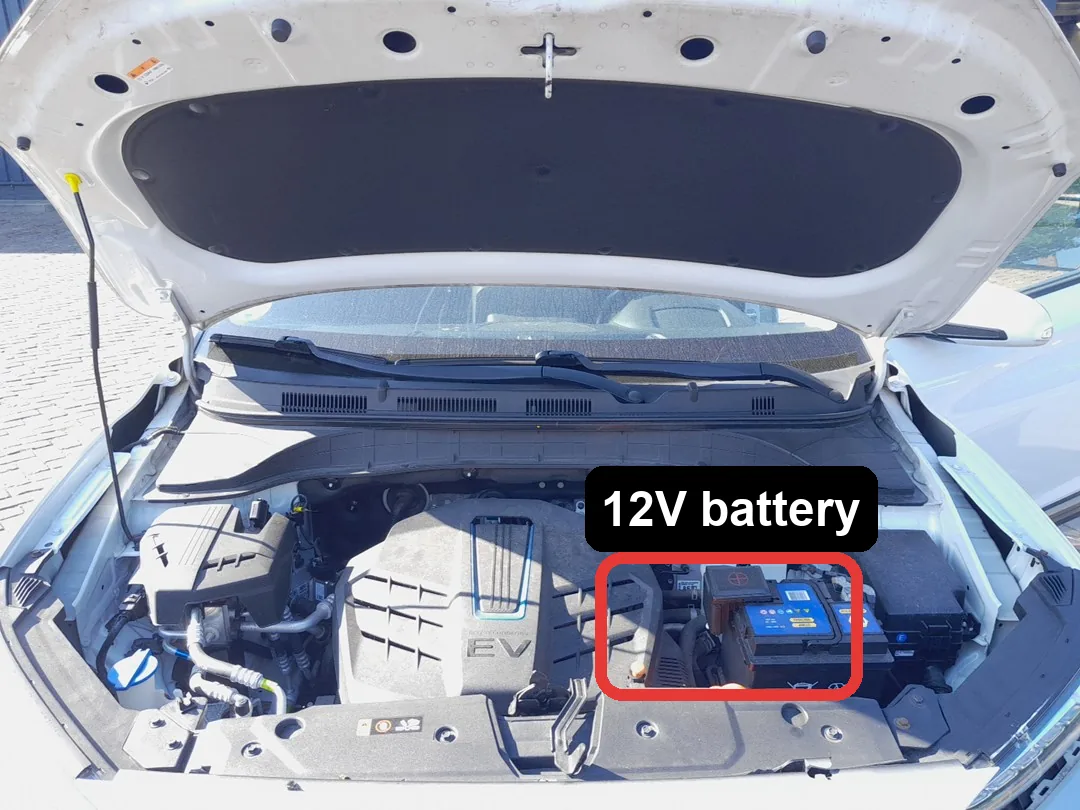
- Turn the ignition off and open the bonnet.
- Slacken the negative (−, earth) terminal first and lift the lead clear.
- Only undo the positive (+) terminal if you are removing the battery completely.
- If removing the battery, undo the hold-down clamp and lift it out upright.
Reconnecting — Correct Order
- Refit the battery and secure the hold-down clamp.
- Connect the positive (+) lead first, then the negative (−) earth lead last. Tighten both firmly.
- Turn the ignition on for a few seconds before starting the engine.
What to Reset Afterwards
- Reset the date and time and re-enter your radio code, presets and preferences.
- Re-initialise the power windows — the one-touch (auto) function won’t work until the windows are re-taught (see our window initialise guide).
- Re-initialise the sunroof if fitted — Hyundai lists this as a required step after reconnecting the battery (see our sunroof initialise guide).
- Re-learn the tyre-pressure system by driving — the Kona relearns automatically (see our TPMS reset guide).
- The ISG start/stop system may stay dormant until the battery is fully charged again — normal for the first drive.
If a Light Won’t Clear
One or two lights right after reconnecting is normal and should clear on a short drive. If the airbag, ABS or engine light stays on, a fault code was logged — reading it needs an OBD scanner, and you can look up what a Hyundai code means on our sister site autodtcs.com.
Frequently Asked Questions
Do I need to register a new battery on a Kona Mk1?
No dealer coding is required on the petrol/diesel Kona. Fit the correct AGM/EFB battery, reconnect, and restore your settings.
Why won’t my windows or sunroof auto-operate after the battery change?
Disconnecting power clears their learned positions. Run the simple re-initialise routines and the one-touch functions return.
How long should I leave it disconnected to reset the electronics?
Around 10–15 minutes with the doors shut lets the modules power down fully.
Is the Kona Electric battery the same job?
Only the 12 V auxiliary battery is owner-serviceable and follows the same order. Never touch the orange high-voltage system — that is dealer/technician work.
To clear the service reminder after maintenance, see our Hyundai Kona service indicator reset guide.
Independent guide — not affiliated with Hyundai. Always follow your official service manual and safety precautions. Read our full disclaimer.