These instructions apply to the Renault Kadjar Mk1 (XFE) 2015-2022.
For other models, please choose your vehicle here.
After an oil-and-filter change the spanner / service message stays lit on your Renault Kadjar (XFE, 2015–2022) until you clear it from the dashboard. It is a maintenance reminder — the car counting down the distance and time to the next scheduled service — not a fault or a warning that something has broken. No diagnostic tool is needed to clear it: it’s a short routine on the instrument-cluster stalk button that any owner can do.
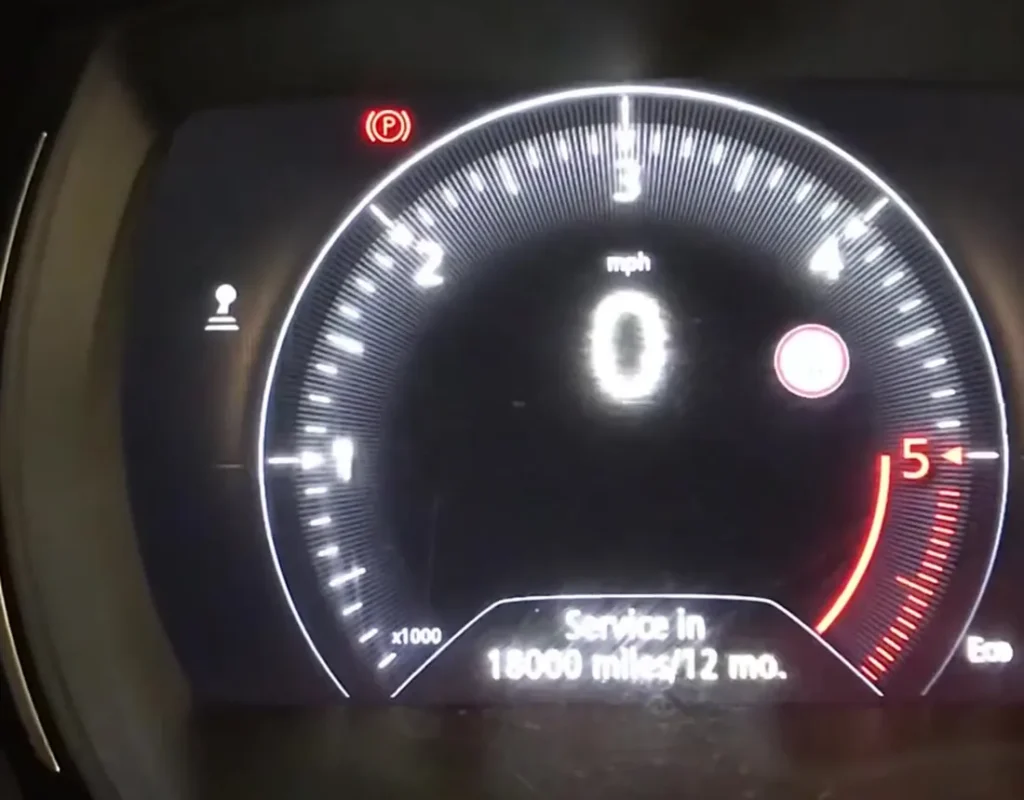
What the Service Spanner Means
The spanner symbol is the Kadjar’s service-interval reminder. As the car is driven it counts down from a full interval, and when it reaches zero it displays the maintenance symbol and a service message to tell you the next oil change and check-over are due. It is separate from the red and amber warning lights: those point to an actual fault, whereas the spanner is purely a time-and-distance reminder that stays on until it is reset.
Because the reminder is based on the schedule rather than on any live measurement of oil condition, it has no way of knowing the work has been carried out. That is why it must be cleared by hand after every service, and why it will keep reappearing at each start-up until you do.
Before You Start
Only reset once the service is genuinely done — the counter is what reminds you when the next oil change is due.
Park on level ground with the handbrake set. You’ll switch the ignition on but leave the engine off for the whole routine, so keep your foot off the start button’s brake and don’t crank the engine. No tools are needed — just the stalk/cluster scroll button and a steady hold.
Resetting the Service Counter
- Switch the ignition on but do not start the engine.
- Use the stalk/cluster scroll button to step through the trip-computer menu to ‘SERVICE INTERVAL’.
- Press and hold the reset button for about 5 seconds — the maintenance symbol and service message appear.
- Keep holding (about 10 seconds total) until the display shows the full distance to the next service.
- Release the button — the interval is reset.
- Switch the ignition off to store it.
If the Reset Doesn’t Work
If the spanner is still showing, the routine almost always just needs to be repeated more carefully:
- Reached ‘SERVICE INTERVAL’ first? — the hold only works on that screen, so scroll to it before pressing and holding.
- Held long enough? — keep the button pressed until the display flips to the full next-service distance; releasing early cancels the reset.
- Engine started by mistake? — it’s ignition-on only; switch off and retry with the engine stopped.
- Cycle and repeat — turn the ignition fully off, wait a few seconds, switch back on and run the whole sequence again.
- Still lit, or a different symbol? — a red or amber warning is a fault, not the service timer, and won’t clear this way.
What to Expect After Resetting
When the reset takes, the display shows the full distance to the next service and the spanner symbol goes out. It should stay off from then on and no longer appear when you switch the ignition on. The reset changes nothing else on the car — it simply restarts the maintenance clock from a full interval.
How Often to Reset It
Reset the counter after every oil-and-filter service, right after the work is finished, so the reminder accurately tracks the next due point. The exact distance and time between services depends on your engine (petrol or the 1.5 dCi diesel) and how the car is used, so follow the service schedule in your owner’s handbook for the figure that applies to your Kadjar rather than a one-size-fits-all number.
Frequently Asked Questions
How do I reset the service light on a Renault Kadjar?
Ignition on, scroll to ‘Service Interval’, hold the reset button about 5 seconds, keep holding to ~10 seconds until the next-service distance shows, then release.
Do I need a Renault diagnostic tool?
No — the reset is built into the dashboard menu.
Why is the spanner still on?
You likely released before the distance redisplayed, or weren’t on the Service Interval screen. Repeat the hold.
Does this fix the underlying fault?
No — it only clears the time/distance reminder, not a warning light caused by a fault.
How long do I keep the button held?
Keep holding through the whole sequence — roughly ten seconds — until the cluster switches to show the full distance to the next service, then let go.
Will resetting it affect the trip computer or anything else?
No — it only restarts the service-interval counter. Your trip data, settings and the rest of the car are untouched.
If a fault symbol (not the service spanner) is lit, look the code up on autodtcs.com. Changing the battery too? See our Kadjar battery guide.
Independent guide — not affiliated with Renault. Always follow your official service manual and safety precautions. Read our full disclaimer.