These instructions apply to the Mazda 2 Mk2 (DE) 2007-2014.
For other models, please choose your vehicle here.
Disconnecting the 12 V battery on a Mazda 2 (DE, 2007–2014) is a simple job for a battery change or before electrical work. Unlike the later i-stop cars, the DE has no battery-management sleep routine to perform — but the order of work still matters, and a couple of things need re-initialising once power is back.
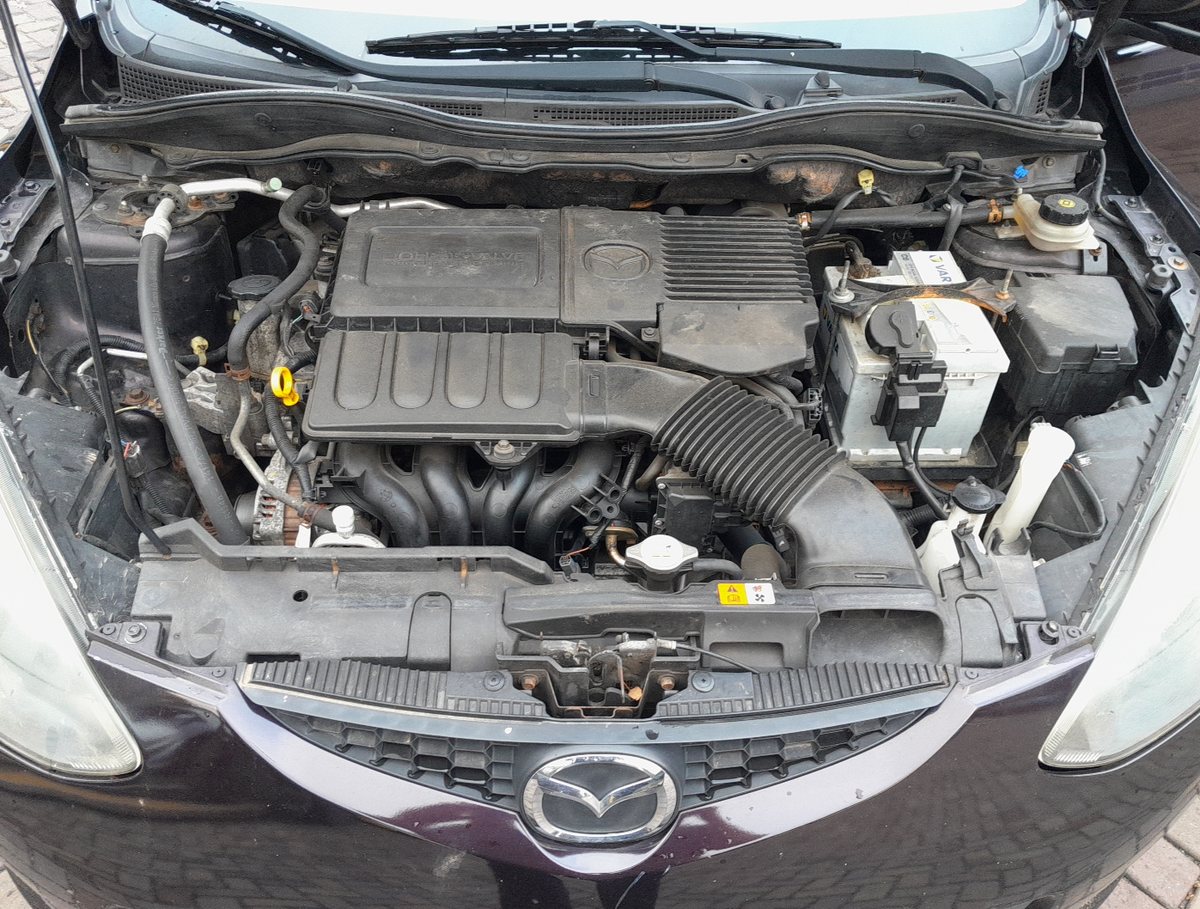
Where the battery is
On the DE the 12 V battery sits in the engine bay, on the right-hand side as you look in. Lift off the terminal cover to reach the two clamps. If you are renewing it, fit a like-for-like battery of the same size and capacity.
Before you disconnect
- Check whether your radio needs a security code and have it ready — power loss will mute a coded unit until it is re-entered.
- Note your preset stations, and the date and time.
- Make sure all electrical consumers are switched off, turn the ignition off and remove the key.
- If you will be working near the airbags or seat-belt pretensioners, wait 2 minutes after disconnecting before touching those parts.
Disconnecting — correct order
- Slacken the clamp on the negative (−, earth) terminal first and lift the lead clear of the post.
- Only undo the positive (+) terminal if you are taking the battery out completely.
- If removing the battery, undo the hold-down clamp at its base and lift it out upright.
Reconnecting — correct order
- Refit the battery and secure the hold-down clamp.
- Connect the positive (+) lead first, then the negative (−) earth lead last, and tighten both firmly.
- Turn the ignition on for a few seconds before starting the engine.
What to reset afterwards
- Re-enter the radio code and reset the clock, presets and personal settings.
- Re-initialise the power windows if one-touch has stopped working — see our window initialise guide.
- If a steering or traction light shows, the steering-angle sensor may need re-calibrating; this needs a diagnostic tool on the DE, so a garage visit clears it.
If a warning light stays on
One or two lights right after reconnecting are normal and usually clear on a short drive. If the airbag, ABS or engine light stays lit, a fault code was stored — reading it needs an OBD scanner (see our OBD-II port location guide), and you can look up what a Mazda code means on autodtcs.com.
Frequently asked questions
Which terminal do I disconnect first on a Mazda 2?
Always the negative (−) earth terminal first, and reconnect it last. This avoids a spanner shorting the live positive post to the bodywork.
Do I need to code a new battery on a DE Mazda 2?
No. The DE has no i-stop battery management, so a straight like-for-like swap needs no dealer coding.
How long should I leave it disconnected to reset the electronics?
About 10–15 minutes with the doors shut lets the modules power down fully.
Will disconnecting the battery clear my service light?
No — the maintenance reminder is stored separately. Reset it with the trip button as shown in our service indicator reset guide.
Independent guide — not affiliated with Mazda. Always follow your official service manual and safety precautions. Read our full disclaimer.