These instructions apply to the Mitsubishi Outlander Mk3 (GF) 2012-2021.
For other models, please choose your vehicle here.
Your Mitsubishi Outlander Mk3 (GF, 2012–2021) has an Auto Stop & Go (AS&G) system that cuts the engine at a halt and restarts it as you pull away. This guide shows how to switch it off — via the dashboard button or the seatbelt trick — and why it sometimes won’t engage on its own.
Option 1 — The Dashboard Button
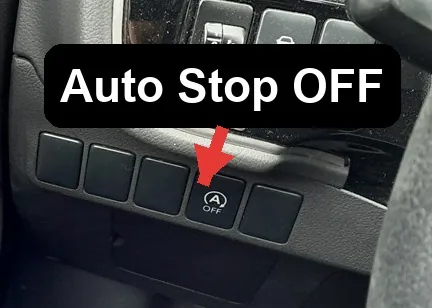

- With the engine running, find the AS&G OFF button on the dashboard (marked with an “A” inside a circular arrow).
- Press it once. The warning light illuminates to confirm the system is switched off.
- The engine will now idle normally at a stop.
Option 2 — Undo the Driver’s Seatbelt
The Outlander also suppresses auto-stop when the driver isn’t belted in or the door is open:
- Disconnect the driver’s seat belt from the buckle, or
- Open the driver’s door.
- With either condition present, the system will not stop the engine.
The button (Option 1) is the proper way to disable it for a drive.
How to Switch It Back On
Press the AS&G OFF button again so the warning light goes out, or simply restart the car — the system defaults back to ON every time you switch the ignition off and on.
Why It Sometimes Won’t Activate
Even with the system enabled, the Outlander skips auto-stop to protect comfort and components when:
- The engine is not yet up to temperature (cold start).
- The battery charge is low — common after a battery change or lots of short trips.
- Cabin heating or demisting needs the engine running.
- The steering is turned, or the car is on a steep slope.
If it stopped working entirely after a battery disconnection, the battery needs to recharge — see our Outlander battery guide.
Frequently Asked Questions
Does the Outlander remember my AS&G setting?
No — it resets to ON every time you restart the car. Press the OFF button each drive if you prefer it disabled.
Is it bad to keep using Auto Stop & Go?
No. The Outlander’s starter and battery are built for it, and the system skips stops when the battery is low to protect itself.
Why did it stop working after a flat battery?
It only runs when the battery is well charged. After a jump-start or battery change it stays dormant until charge recovers; a few longer drives usually restore it.
Can I turn it off permanently?
Not from the dashboard — the button is per-drive only. A permanent change would need dealer-level configuration, which most owners skip given the simple button.
If a warning light appeared alongside the fault, look up the code on autodtcs.com. To clear a service reminder, see our Mitsubishi Outlander service indicator reset guide.
Independent guide — not affiliated with Mitsubishi. Always follow your official service manual and safety precautions. Read our full disclaimer.