These instructions apply to the Renault Clio Mk4 (X98) 2012-2019.
For other models, please choose your vehicle here.
The Renault Clio Mk4 (X98, 2012–2019) — the fourth-generation Clio supermini hatchback / Estate (Grandtour / Sport Tourer), built in Bursa (Turkey) and Flins (France) for European sale across pre-facelift (2012–2016) and facelift (2016–2019) variants with a broad engine range covering 0.9 TCe 76 / 90 (H4B-400/H4B-408/H4B-410/H4B-412, 56/66 kW petrol with optional LPG), 1.2 16V (D4F, 55 kW petrol), 1.2 TCe 120 (H5F-403/H5F-408, 87/88 kW), 1.5 dCi 75 / 90 / 110 (K9K, 55/66/81 kW diesel), 1.6 RS 200 / 220 EDC (M5M, 147–162 kW Sport Renaultsport), and the Clio Cup / Trophy track variants — uses Renault’s wiper-stalk reset-button hold, the same procedure shared across the X87 Captur and Megane III/IV. The procedure is identical across every X98 engine variant including the RS, and across both pre-facelift and facelift cars. No diagnostic tool needed.
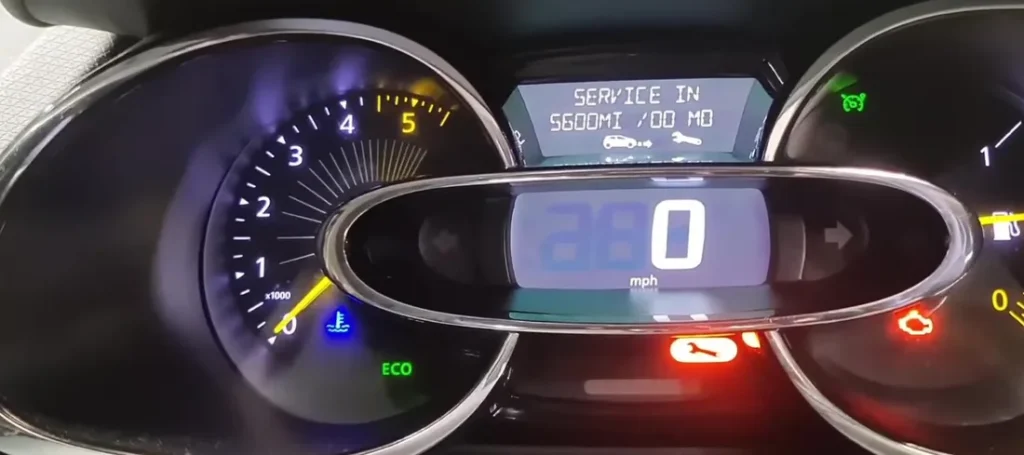
When to Reset the Service Indicator
- After completing an oil and filter change at the scheduled interval.
- If the cluster shows “Service required” or “Service due in 0 km” at startup.
- After a scheduled inspection service.
⚠️ Renault’s own documentation explicitly warns: “Do not reset the indicator if the oil is changed sooner than indicated.” Resetting early throws off the next service prediction and may delay the next genuine signal.
Before You Begin
- Park on a level surface with the engine off.
- Complete the actual oil and filter change before the reset.
- ⚠️ Do not press any of the pedals during the reset — Renault’s cluster firmware checks for pedal input and aborts if it detects any pedal touch.
- For keyless / Smart card cars: insert the key card into the dashboard slot below the start/stop button before pressing START. For older / non-keyless cars, simply turn the key to “ON” (position II) without pressing the clutch.
- Locate the reset button on the wiper-control stalk — small round button on the end face of the right-hand stalk, often with a small clock / wrench icon. Same button used to scroll through trip-info screens during normal driving.
What You’ll Need
None for the reset itself. For the oil change, fresh Renault-spec oil — 5W-30 ACEA C4 / Renault RN 0720 for the 1.5 dCi K9K diesel (the K9K is famously specific about oil — using anything other than RN 0720 risks oil-pump pickup blockage from polymer additives); 5W-40 ACEA A3/B4 / Renault RN 0700 for the 0.9 / 1.2 TCe petrol; 5W-30 ACEA A3/B4 / RN 0700 for the older 1.2 16V D4F; 5W-40 ACEA A3/B4 / RN 0700 for the 1.6 RS M5M. A new spin-on or cartridge filter (different parts for K9K diesel, H4B/H5F petrol, and M5M RS); a 13 mm sump-plug socket; torque 20 Nm. Capacity: 0.9 TCe takes 4.2 L with filter; 1.2 TCe takes 4.5 L; 1.5 dCi K9K takes 4.5 L; 1.6 RS takes 5.4 L.
The Service Reset Procedure
- (Keyless / Smart card cars) Insert the key card into the dashboard slot.
- Without pressing any pedals, briefly press the start/stop button to turn the ignition on. Do not start the engine. (On non-keyless cars: turn the key to “ON” position II without pressing the clutch.)
- Use the cluster MFD controls or the wiper-stalk scroll to navigate the trip-info menus.
- Select ‘Service due in’ or ‘Service required’ from the menu, depending on what the cluster currently shows.
- Press and hold the reset button on the right-hand wiper-control stalk.
- Keep the reset button pressed for at least 10 seconds.
- The new service interval distance appears on the display — typically “Service due in 18,000 km” or equivalent.
- The service indicator is now reset.
- Release the reset button.
- Turn the ignition off. Reset complete.
Verify the Reset Worked
Switch the ignition off, wait 30 seconds, then cycle back on (without pressing any pedal). The “Service required” / “Service due in” warning should now show the fresh full interval. Typical X98 Clio intervals:
- 0.9 / 1.2 TCe petrol: 18,000 miles (29,000 km) or 24 months — Renault’s standard long-life schedule.
- 1.2 16V D4F petrol: 18,000 miles (29,000 km) or 12 months.
- 1.5 dCi diesel: 18,000 miles (29,000 km) or 24 months (with RN 0720 oil only).
- 0.9 TCe LPG: 12,500 miles (20,000 km) or 12 months.
- 1.6 RS 200 / 220 EDC: 12,500 miles (20,000 km) or 12 months — Renault shortens the interval for the RS.
UK severe-service / short-trip driving requires halving the interval manually. The dCi diesel particularly benefits from a shorter interval in urban use because the K9K is prone to oil dilution from short trips with no DPF regen.
If Something Goes Wrong
- The wiper-stalk reset button does nothing. Confirm the cluster MFD currently shows “Service required” or “Service due in X km” — the reset only fires from that specific screen. Use the wiper-stalk scroll to cycle through trip-info screens until the service item appears, then start the 10-second hold.
- The reset starts but then stops partway. You touched a pedal — Renault firmware aborts. Restart from step 1 with no pedal contact.
- I held the button for 10 seconds but no new interval appeared. Continue holding past 10 seconds — some firmware versions need 12–15 seconds before the new interval renders. Don’t release until the new distance is shown.
- The reset takes but the warning returns at the next start. 12V battery condition. Load-test; replace if older than 5 years on Start-Stop cars. The Clio Mk4’s battery is small and ages quickly in stop-start use.
- I have a non-keyless Clio — same procedure? Yes. Just turn the key to “ON” position II (the last detent before starter) without pressing the clutch, then follow from step 3.
- 2016 facelift Clio — anything different? The 2016 facelift updated the LED daytime running lights, added the R-Link Evolution / Media Nav Evolution infotainment options, and refreshed interior trim, but kept the cluster MFD and wiper-stalk reset button unchanged. Procedure unchanged.
- 1.5 dCi diesel — anything different? No, same procedure. Critical: only use Renault RN 0720 oil. Non-RN 0720 5W-30 voids the maintenance algorithm and risks K9K oil pickup blockage.
- Clio RS 200 / 220 EDC — anything different? Same cluster, same wiper-stalk reset button. The shorter RS oil interval is built into the algorithm — the reset path is identical.
Frequently Asked Questions
What does the “Service due in” or “Service required” message on the Clio mean?
The “Service due in X km” message is a countdown to the next scheduled service. At 0 km it changes to “Service required”. It’s a maintenance signal, not an engine fault — the orange CEL is separate.
Do I need a diagnostic tool?
No. The wiper-stalk reset is the owner-accessible standard. Renault CLIP and aftermarket Renault-aware tools can reset via OBD-II but aren’t needed.
Does the reset clear engine fault codes?
No. The reset zeros the service-distance counter only. Engine fault codes need a scan tool. For DTC interpretation see autodtcs.com.
Why does Renault warn about not pressing pedals?
The cluster firmware uses pedal input as a “driver is about to drive” signal — the reset routine is locked out when any pedal is depressed, as a safety / data-integrity measure to prevent accidental resets while the car is in motion or about to move.
Is the procedure the same as the Renault Captur Mk1?
Yes — the Clio X98 and Renault Captur Mk1 (X87, 2013–2020) share the same B-platform cluster and the same wiper-stalk reset button. The procedure is identical, including the 10-second hold and the “no pedals” requirement. The Megane III/IV use the same method.
How often does the Clio service indicator come up?
Renault’s published interval for the X98 Clio is 18,000 miles (29,000 km) or 24 months on petrol and standard diesel, 12,500 miles / 12 months on the LPG and RS variants. UK city use typically signals earlier — every 12 months is realistic for daily-commute Clios.
What about the Clio Mk5 (XJA, 2019+)?
The Mk5 Clio (XJA, 2019–) introduced Renault’s newer “EasyLink” 9.3-inch portrait touchscreen and a fully digital cluster on higher trims. The reset path moved into the digital cluster’s settings menu. We’ll publish a dedicated XJA guide.
For DTC code interpretation on Renault vehicles see autodtcs.com.
Independent guide — not affiliated with Renault. Always follow your official service manual and safety precautions. Read our full disclaimer.