These instructions apply to the Skoda Octavia Mk4 (NX) 2020-Present.
For other models, please choose your vehicle here.
When the spanner or a “Service” reminder appears on your Skoda Octavia Mk4 (NX, 2020–present), a service interval (oil or inspection) has elapsed. You can clear it yourself in seconds — either with the trip-reset button or through the Virtual Cockpit menu. Do the service first, then use whichever your car has.
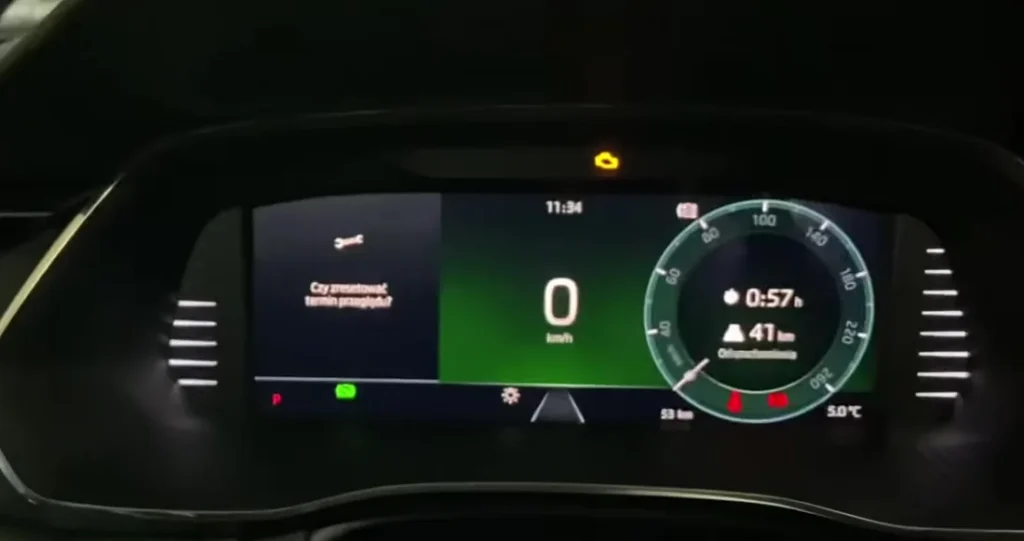
The fourth-generation Octavia (chassis NX) shows its maintenance prompt as a spanner symbol with a “Service” message in the driver display. This is a reminder, not a fault. The car keeps two separate service counters — one for the oil change and one for the larger periodic inspection — and lights the spanner when whichever is due first runs out. The engine is running normally; the display is simply flagging that scheduled maintenance is due.
What the Service Message Means
The Octavia’s reminder is interval-based, counting down distance and time since the last reset. Depending on how the car is configured, the oil-service side can run on a longer, flexible schedule while the inspection is more of a fixed time/distance check. Because the counter works from those limits rather than from the oil’s actual condition, it can’t tell that fresh oil has gone in — it keeps showing until you reset it. A steady spanner with “Service” or “Inspection” text is the normal prompt; a red oil-pressure or engine symbol is a fault and belongs to a different system.
Reset Only After the Service
The interval is just a distance/time counter; clearing it early hides the reminder while the oil and filters keep ageing. Reset it only once the work is done. Before you begin:
- Park on level ground with the parking brake applied.
- Have the ignition on and the engine off for the button method.
- No tools are needed — the trip-reset button and, on digital-cockpit cars, the on-screen menu do the whole job.
- Know which prompt you’re clearing: after a full service you may need to reset both the oil and the inspection counter.
Method 1 — Reset Button
- Turn the ignition off.
- Press and hold the reset (0.0) button (the trip-reset on the wiper stalk or instrument panel).
- While holding it, turn the ignition on.
- ‘Reset oil change service?’ appears — release the button, then press it again to confirm.
- For the inspection counter, repeat the sequence and confirm at ‘Delete inspection?’.
Method 2 — Virtual Cockpit / Display Menu
On Octavias with the digital cockpit you can reset through the menu: open Settings → Service (or the infotainment Car → Service menu), choose the oil or inspection reset, and confirm.
If the Reminder Returns
If the spanner is still there after the reset, check these before assuming a problem:
- It comes back at start-up — the confirmation wasn’t completed; repeat and make sure you confirm the on-screen prompt.
- Only one counter cleared — after a full service both oil and inspection may need resetting; do the second one too.
- Button held too briefly — keep the reset button pressed as you switch the ignition on, then wait for the prompt before releasing.
- A different warning is on — that’s a fault, not the service timer, and won’t clear this way.
What to Expect After Resetting
When the reset registers, the spanner clears and the counter you reset restarts at a full interval. The “Service” message should be gone at the next ignition-on. There is no drive cycle to complete and nothing to relearn — the counter simply begins again. If it reappears after a restart, the confirmation didn’t go through, so run the method again.
How Often to Reset It
Reset each counter once, at the point its service is carried out — oil at the oil change, inspection when the periodic inspection is done. The Octavia’s exact intervals depend on engine, schedule type and use, so rather than quote a figure, follow the plan in your own vehicle handbook and reset to match the work completed. Keeping the reset aligned with the actual service keeps both counters honest.
Frequently Asked Questions
Where is the reset button on the Octavia Mk4?
The trip-reset (0.0) button — on the wiper stalk or instrument panel, the one you use to zero the trip. Hold it while switching the ignition on to bring up the service-reset prompt.
Why are there two resets (oil and inspection)?
Skoda tracks oil-change and inspection intervals separately. Reset whichever the display prompts; do both after a full service.
Does the engine need to run?
No — the button method wants ignition on with the engine off. Don’t start the engine during the sequence.
Can I reset through the Virtual Cockpit instead?
Yes, on cars with the digital cockpit. Open Settings → Service (or the Car → Service menu), pick the oil or inspection reset, and confirm.
The light stays on after resetting — why?
The confirmation wasn’t completed, or a separate fault is present. Repeat the reset; if it returns, have it scanned.
Does resetting mean the service is done?
No. The reset only clears the reminder — the oil, filter or inspection work is what actually services the car. Do the work first, then reset.
If a warning light appeared with the service message, look it up on autodtcs.com. After battery work, see our Octavia Mk4 battery guide.
Independent guide — not affiliated with Skoda. Always follow your official service manual and safety precautions. Read our full disclaimer.