These instructions apply to the Vauxhall Astra Mk7 (K/B16) 2015-2021.
For other models, please choose your vehicle here.
The Vauxhall Astra (Mk7/K, 2015–2021) was the last Astra built on a GM platform before the Stellantis takeover, and its infotainment reflects that: it runs GM IntelliLink, most commonly the Navi 900 IntelliLink with its wide colour touchscreen, or the smaller R 4.0 / Navi 5.0 IntelliLink units on lower trims. Because these are General Motors systems — not the PSA NAC unit of the later Astra L — a frozen or unresponsive screen is rebooted using the GM IntelliLink method, from the driver’s seat, with no tools.
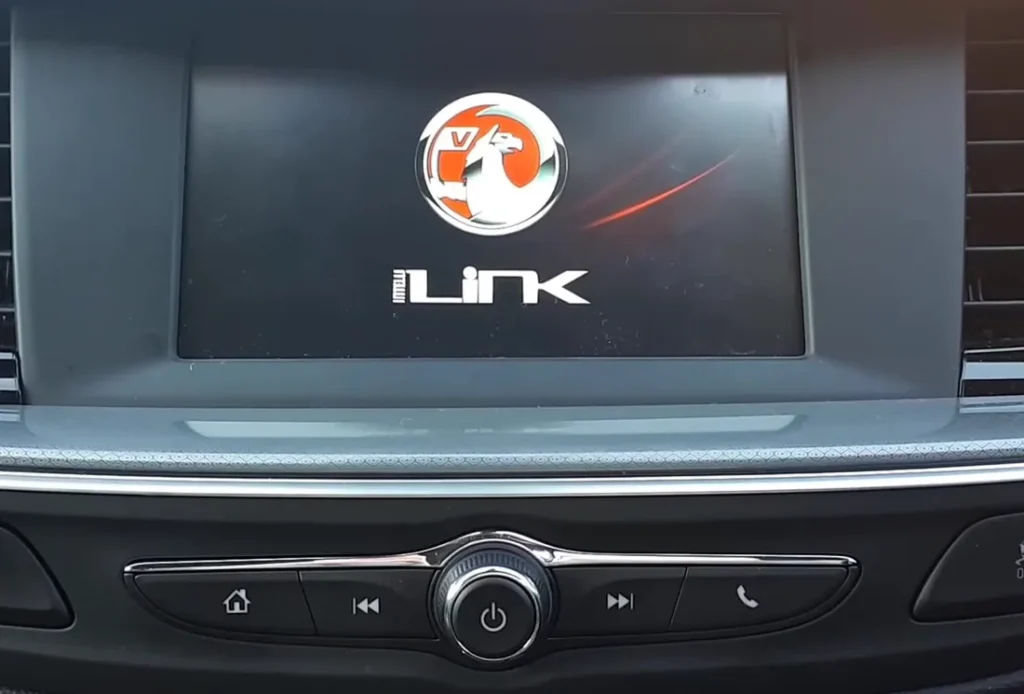
Which system the Astra K uses
The Mk7 Astra uses GM IntelliLink (Navi 900 / R 4.0 / Navi 5.0). Controls are a power/volume rotary knob with hard keys including Home and the media-transport buttons. This is the same GM family as the Astra J and Corsa E, so the same Home + Fast-Forward and power-knob reboots apply — and the Stellantis single-long-press method from the Astra L will not work here.
Soft reset (the normal fix)
- Switch the ignition on so the cluster and infotainment are powered.
- Press and hold the Home button and the Fast-Forward (next-track) button together for about 10 seconds, until the unit powers off.
- Wait a few seconds for the shutdown to complete fully.
- Press the power/volume knob to begin the power-up sequence, and let the Vauxhall logo and home screen load.
- Alternatively, on Navi 900 units a long press of the power/volume knob (10 seconds or so) triggers the same reboot.
Is it safe? Will I lose data?
Yes — the reboot is non-destructive. Radio presets, paired Bluetooth devices, saved navigation favourites and your Apple CarPlay / Android Auto pairing all remain. It restarts the head unit; it does not erase its memory.
If it stays frozen
- Turn the ignition off, open and close the driver’s door, then restart — the door cycle helps the unit power down properly.
- Lock the car and leave it 20–30 minutes; some Astra K freezes clear after the system sleeps. Owners also report checking instrument-panel fuses F4, F34 and F37 if the unit stays completely dead.
- Repeat the Home + Fast-Forward hold; a single try can fail if it locked mid-task.
- As a last resort, pull the radio/infotainment fuse for around 30 seconds, or disconnect the 12V battery negative terminal for ten minutes — both force a hard power-down and reset the clock.
Factory reset (erases data)
If the IntelliLink keeps locking up, restore it to defaults. From the home screen open Settings, find the system/restore section and choose the restore-factory-settings option, confirming when prompted. This clears presets, paired phones and saved destinations, so reserve it for repeat freezes that a reboot will not cure.
Frequently Asked Questions
Does the Astra K reset the same way as the newer Astra L?
No. The Astra K uses GM IntelliLink, rebooted by Home + Fast-Forward or a long power-knob press. The Astra L (2022 on) uses the Stellantis NAC system, which reboots on a single long power-knob press through Settings → System for a factory reset — a different platform entirely.
My Navi 900 screen is black or flickering but the radio works — will a reset fix it?
Try the reboot first. However, the Navi 900 has a well-documented LCD failure where the panel goes black, half-lit or flickers while audio keeps playing — if a reboot does not restore the picture, that is a hardware screen fault, not a software freeze, and usually needs the LCD repaired or replaced.
Will rebooting delete my CarPlay pairing or presets?
No. A soft reboot keeps CarPlay/Android Auto pairings, radio presets and nav favourites. Only a factory restore from Settings wipes them.
The Home + Fast-Forward combo did nothing — what now?
Hold them longer (a full 10 seconds) with the ignition on, or use the power-knob long press instead. If neither responds at all, the unit may have lost power — check the infotainment fuse.
How often is an infotainment reset normal on an Astra K?
The odd reboot after a glitch is normal. Frequent freezing can indicate an out-of-date IntelliLink software build — a Vauxhall dealer can flash the latest version.
If a stored fault code accompanies a screen that stays dead after rebooting, decode it on autodtcs.com to tell a wiring or module fault from a failed display.
Independent guide — not affiliated with Vauxhall. Always follow your official service manual and safety precautions. Read our full disclaimer.