The OBD-II port is the 16-pin socket you plug a diagnostic scan tool into to read fault codes, watch live data and carry out many service resets. The good news is that it is in a broadly similar place on almost every car. This guide explains where to look, how to find it in under a minute, what the rules are (including on electric cars), and shows the exact location on a range of models with our own photos.
Where is the OBD-II port? The quick answer
On nearly every car the OBD-II port is in the driver’s footwell area, under or around the dashboard, within reach of the driver’s seat. That is not a coincidence: the OBD-II standard (SAE J1962) requires the connector to be within about 60 cm of the steering wheel and accessible without tools.
In practice it lives in one of a handful of spots:
- Under the dash, just above the pedals
- Low on the dash near or left of the steering column
- Behind or below the fuse-box cover on the driver’s side
- Behind a small clip-off or flip-down trim panel
- Occasionally behind the ashtray or inside the center console
How to find the OBD-II port in 30 seconds
- Sit in the driver’s seat and look down into the footwell, under the lower edge of the dashboard.
- Scan the area from the steering column across to the center, roughly knee height. A torch or your phone light helps.
- Look for a 16-pin trapezoid-shaped socket – a wide, slightly D-shaped connector. It may be facing down or toward you.
- If you can’t see it, feel for (and gently pull off) a small cover or trim panel, or open the hinged fuse-box flap – on many cars the port hides just behind it.
Once you find it, the ignition usually needs to be on (or the car in the READY state) for a scan tool to communicate.
Do electric and hybrid cars have an OBD-II port?
Yes. Electric and hybrid cars keep the same standard 16-pin OBD-II connector in the same driver’s-side under-dash area. A pure EV has no exhaust emissions system, but the socket is still fitted for diagnostics, and a compatible scan tool can read vehicle fault codes and, with the right software, EV-specific data such as battery state of health. The Mazda 6e below is a good example – a brand-new electric car with an ordinary OBD-II port above the brake pedal.
What you can do once you find it
With a scan tool plugged into the OBD-II port you can read and clear diagnostic trouble codes (DTCs) behind a warning light, view live sensor data, check readiness for an emissions test, and on many cars perform resets such as the service light, oil reset or throttle relearn.
What you’ll need: an OBD-II scanner
Almost any OBD-II scanner works on a 1996-or-newer US car, a 2001-or-newer EU petrol car, or a 2004-or-newer EU diesel. There are three broad choices:
- A basic code reader or ELM327-type app dongle – cheap, reads and clears generic codes, pairs with a phone app. Fine for “what turned my check-engine light on?”.
- A standalone color-screen tool – no phone needed, adds live data and more reset functions.
- A pro / bidirectional scanner – manufacturer-level codes and active tests; what a workshop uses.
OBD-II port location by car (our own photos)
Below are first-hand photos of the OBD-II port on cars we’ve had hands-on, with the exact spot on each. Select your model to open its full set of reset and maintenance guides.
Jump to your make: Hyundai · Kia · Mazda · Mitsubishi
Hyundai


Kia


Mazda

Mitsubishi

All photos are of left-hand-drive cars; on a right-hand-drive car the port is in the mirror-image position on the driver’s side. We add cars as we photograph them, so check back as the list grows.
OBD-II pinout (the 16-pin connector)
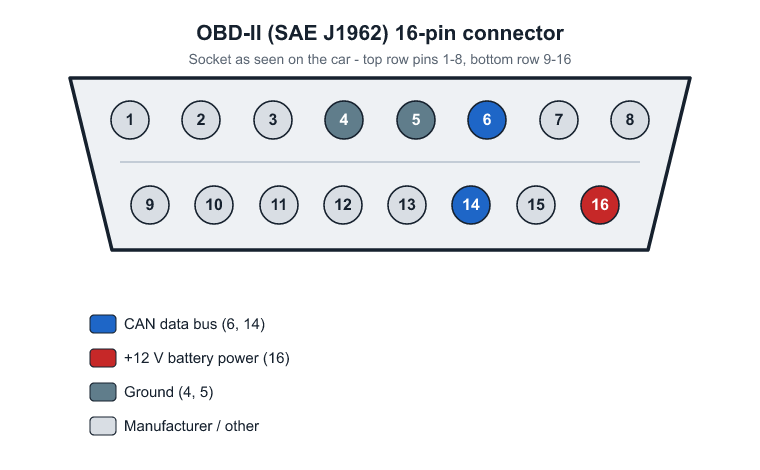
Most owners never need the pinout – a scan tool uses the right pins automatically – but it is handy if you are wiring an adapter or checking that the socket has power. The 16-pin OBD-II (SAE J1962) connector is laid out as follows:
| Pin | Signal | Pin | Signal |
|---|---|---|---|
| 1 | Manufacturer-defined | 9 | Manufacturer-defined |
| 2 | SAE J1850 bus + | 10 | SAE J1850 bus – |
| 3 | Manufacturer-defined | 11 | Manufacturer-defined |
| 4 | Chassis ground | 12 | Manufacturer-defined |
| 5 | Signal ground | 13 | Manufacturer-defined |
| 6 | CAN high (ISO 15765-4) | 14 | CAN low (ISO 15765-4) |
| 7 | K-line (ISO 9141-2 / 14230-4) | 15 | L-line (ISO 9141-2 / 14230-4) |
| 8 | Manufacturer-defined | 16 | Battery power, +12 V |
The two pins that matter on most modern cars are 6 and 14 (CAN high and low) – the data bus used by roughly every car since 2008. Pin 16 is always +12 V battery power and pins 4 and 5 are grounds, so a quick voltage check between pin 16 and pin 4 tells you the socket is live. The older K-line (pin 7) appears on pre-CAN cars, and the manufacturer-defined pins vary by brand.
Common mistakes and tips
- Don’t confuse it with other connectors. The OBD-II port is a distinctive wide 16-pin trapezoid. Other white or black plugs up under the dash are wiring connectors, not the diagnostic socket.
- Check behind covers. On many cars the port is hidden behind the fuse-box flap or a small trim panel – it is rarely fully out in the open on newer models.
- Mind the ignition. Most scanners need the ignition on (engine off) or an EV in the READY state to connect.
- Be gentle. Line the connector up squarely – the pins bend if forced at an angle.
- Mind nearby wiring. The under-dash area can carry airbag and sensor wiring, so ease covers and trim panels off rather than yanking them.
Frequently asked questions
Why can’t I find my OBD-II port?
It is probably behind a cover. Look for a hinged fuse-box flap or a clip-off trim panel low on the driver’s side and gently remove it – the socket often sits just behind or below the fuses.
Is the OBD-II port always under the dash?
Almost always on the driver’s side under the dash, but a few cars place it behind the ashtray or inside the center console. If it isn’t above the pedals, check around the console and steering column.
Do I need a special scanner for my car?
No – any OBD-II/EOBD scanner reads generic codes on a compliant car. Manufacturer-specific codes and some resets need a more capable or brand-specific tool.
