These instructions apply to the Kia Rio (UB, QBR) 2011 - 2018. For other models, please choose your vehicle here.
The Kia Rio (2011–2018) uses a 12 V battery to power all electrical systems. If you need to replace the battery, perform electrical work, or store the car, disconnecting and reconnecting the battery correctly will help prevent ECU faults and ensure features like power windows and sunroof can be re-initialized properly.
Before You Start
- Park the vehicle on level ground, switch ignition OFF, and remove the key.
- Wait at least 3 minutes before disconnecting so modules shut down fully.
- Wear gloves and eye protection.
- Use a 10 mm spanner or socket for the terminal clamps.
Battery Location
- The battery is located in the engine bay, secured with a hold-down bracket.
- Remove the protective cover to access the terminals.
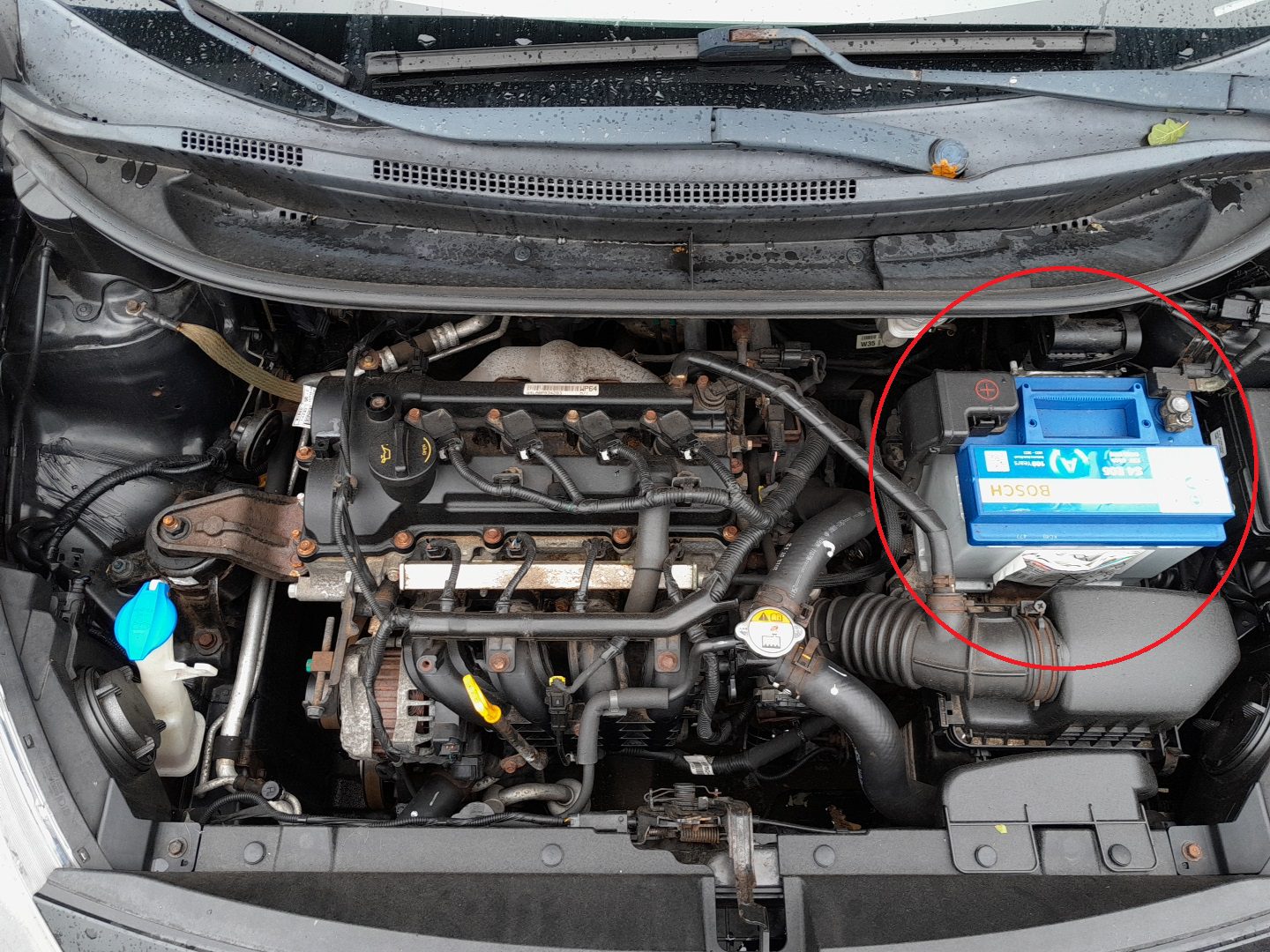
How to Disconnect the Battery
- Switch off all lights and accessories.
- Loosen the negative (–) terminal clamp first and remove it from the post.
- Then loosen and remove the positive (+) terminal clamp.
- If removing the battery completely, undo the hold-down bracket and carefully lift the battery out — it is heavy.
How to Reconnect the Battery
- Position the battery in the tray and secure it with the hold-down bracket.
- Reconnect the positive (+) terminal first and tighten it securely.
- Reconnect the negative (–) terminal last and tighten.
- Refit the protective cover.
After Reconnecting
- Re-initialize power windows and sunroof functions if equipped.
- Reset the service indicator if required.
- Reset clock and radio presets.
Maintenance Tips
- Always disconnect the negative (–) first and reconnect it last.
- Keep terminals clean; apply a small amount of dielectric grease to reduce corrosion.
- If the car struggles to start after reconnecting, test the battery health or alternator output.
Disclaimer: The information on this page is provided for general guidance only. Always follow your official service manual and safety precautions when working on your vehicle. We are not responsible for errors, omissions, or any damage resulting from the use of this information.
This website is an independent resource and is not affiliated with, endorsed by, or sponsored by Kia. All trademarks and brand names belong to their respective owners.