These instructions apply to the Mazda 2 Mk2 (DE) 2007-2014.
For other models, please choose your vehicle here.
When the tyre-pressure warning light on your Mazda 2 (DE, 2007–2014) stays on after you have rotated the wheels, fitted winter tyres or corrected the pressures, the tyre-pressure monitoring system (TPMS) needs to relearn. On the DE this can be done without a diagnostic tool — the system re-registers the wheel sensors as you drive.
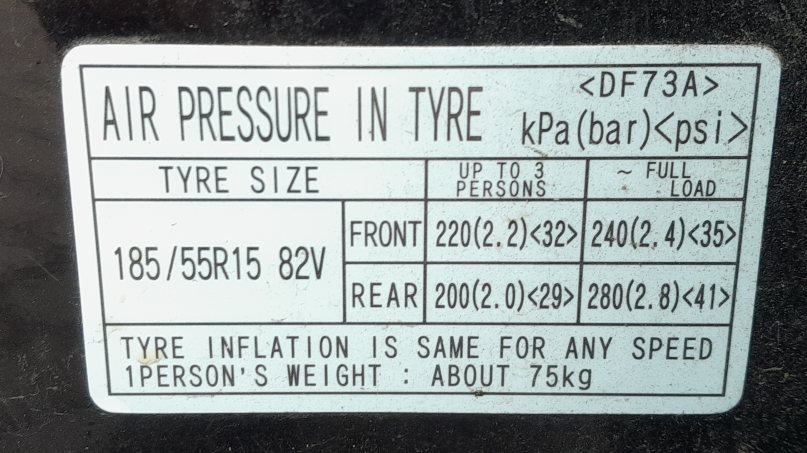
Set the pressures first
A relearn only works from correct pressures. Set all four tyres cold to the figures on the placard in the driver’s door pillar — on most DE Mazda 2s that is around 2.2 bar (32 psi), but always use the exact values printed on your car’s label. Don’t forget to include the spare if it carries a sensor.
Reset without a diagnostic tool
- With the pressures correct, turn the ignition switch ON, then OFF.
- Wait about 15 minutes with the car stationary so the system settles.
- Start the engine and drive normally for at least 10 minutes.
- Keep your speed above 25 km/h (15 mph) for part of the drive so each wheel sensor reports in.
- The TPMS warning light should go out once all four sensors are registered.
If the light was flashing rather than steady, that points to a sensor or system fault rather than just a lost calibration — complete the drive cycle first, then have it read if it keeps flashing.
When a relearn is needed
- After changing or rotating one or more wheels/tyres.
- After adjusting the pressures or a seasonal tyre swap.
- After a battery disconnect in some cases.
Frequently asked questions
Why is my Mazda 2 tyre light still on after inflating the tyres?
The system needs a short drive to re-read the sensors. Set the cold pressures to the door-pillar values, then drive above 25 km/h for ten minutes and it should clear.
Does the DE Mazda 2 have sensors in the wheels?
Yes — it uses a direct system with a sensor in each wheel, which is why the relearn happens as you drive rather than by a single button press.
The light is flashing, not steady — what does that mean?
A flashing TPMS light usually signals a sensor fault or a flat battery in one sensor, not just a lost calibration. If it keeps flashing after a drive, have the sensors checked.
Where do I find the correct pressures?
On the placard in the driver’s door pillar (and in the handbook). Our tyre sidewall guide also explains the load and speed markings.
If a warning light other than the tyre symbol appears, read the code with a scanner — see our OBD-II port location guide and decode it on autodtcs.com.
Independent guide — not affiliated with Mazda. Always follow your official service manual and safety precautions. Read our full disclaimer.