These instructions apply to the Honda Insight Mk2 (ZE2) 2009-2014.
For other models, please choose your vehicle here.
If the automatic (one-touch) up or down on your Honda Insight (ZE2, 2009–2014) has stopped working — usually after the 12 V battery was disconnected or went flat — the power-window control unit needs re-initialising so the auto and anti-trap functions return. The Insight’s routine includes a quick fuse pull, then a switch relearn.
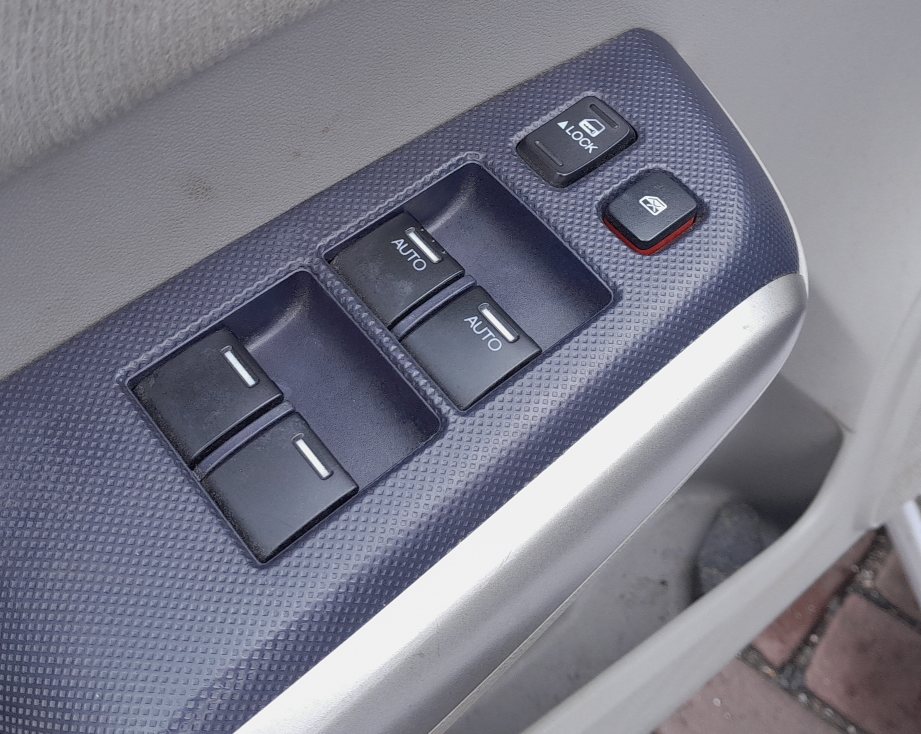
Why one-touch stops
The window module stores the fully-open and fully-closed positions. When power is lost, that memory clears, so the glass still moves while you hold the switch but one-touch and jam protection stop working. Re-initialising teaches the limits again.
Step 1 — reset the control unit
- Close the driver’s door and turn the ignition off.
- Remove the fuse for the power-window control unit (see the fuse chart in your handbook).
- Turn the ignition on, wait 1 second, then turn it off.
- Wait 5 seconds, then refit the fuse.
Step 2 — relearn the driver’s window
- Turn the ignition on and start the engine.
- Press and hold the switch DOWN and open the window fully, then release.
- Open the driver’s door.
- Press and hold the switch UP until the window is fully closed, then keep holding for about 1 second and release.
- Test one-touch up and down — it should now run automatically.
If it still will not learn, repeat the whole routine, making sure you hold the switch at the very top and bottom for a moment before releasing.
Frequently asked questions
Do I really need to pull the fuse?
On the Insight, yes — removing and refitting the power-window fuse resets the control unit before you re-teach the window limits. Without the fuse step, the switch relearn often will not take.
Why did AUTO windows stop after a battery change on my Insight?
Disconnecting the battery clears the window control unit’s stored limits. Manual operation still works, but one-touch and anti-trap only come back after the fuse-reset and switch relearn above.
Which fuse do I pull?
The power-window (P/W) control-unit fuse — check the fuse-box lid or handbook diagram for the exact position, which varies by market and year.
Do I have to do the rear windows too?
The relearn is centred on the driver’s master switch. Do the driver’s window as above; if a passenger window still lacks one-touch, run the hold-open/hold-closed step at that switch.
This is almost always needed after a battery disconnect — see the safe procedure in our Honda Insight battery guide.
Independent guide — not affiliated with Honda. Always follow your official service manual and safety precautions. Read our full disclaimer.