These instructions apply to the Kia Rio Mk3 (UB/QBR) 2011-2018.
For other models, please choose your vehicle here.
Every Kia Rio (2011–2018) is fitted with a standard OBD-II diagnostic port, the 16-pin connector that lets a scan tool talk to the car’s control modules. Through it you can read engine fault codes, clear warning lights once a problem is fixed, and watch live sensor data such as coolant temperature or fuel trims. The good news for owners is that you do not need to remove any trim to reach it — the socket is designed to be accessible from the driver’s seat. This guide shows exactly where the connector sits on this generation of Rio and how to plug in safely, so a cheap Bluetooth adapter or a handheld scanner can be used with confidence.
OBD-II Port Location
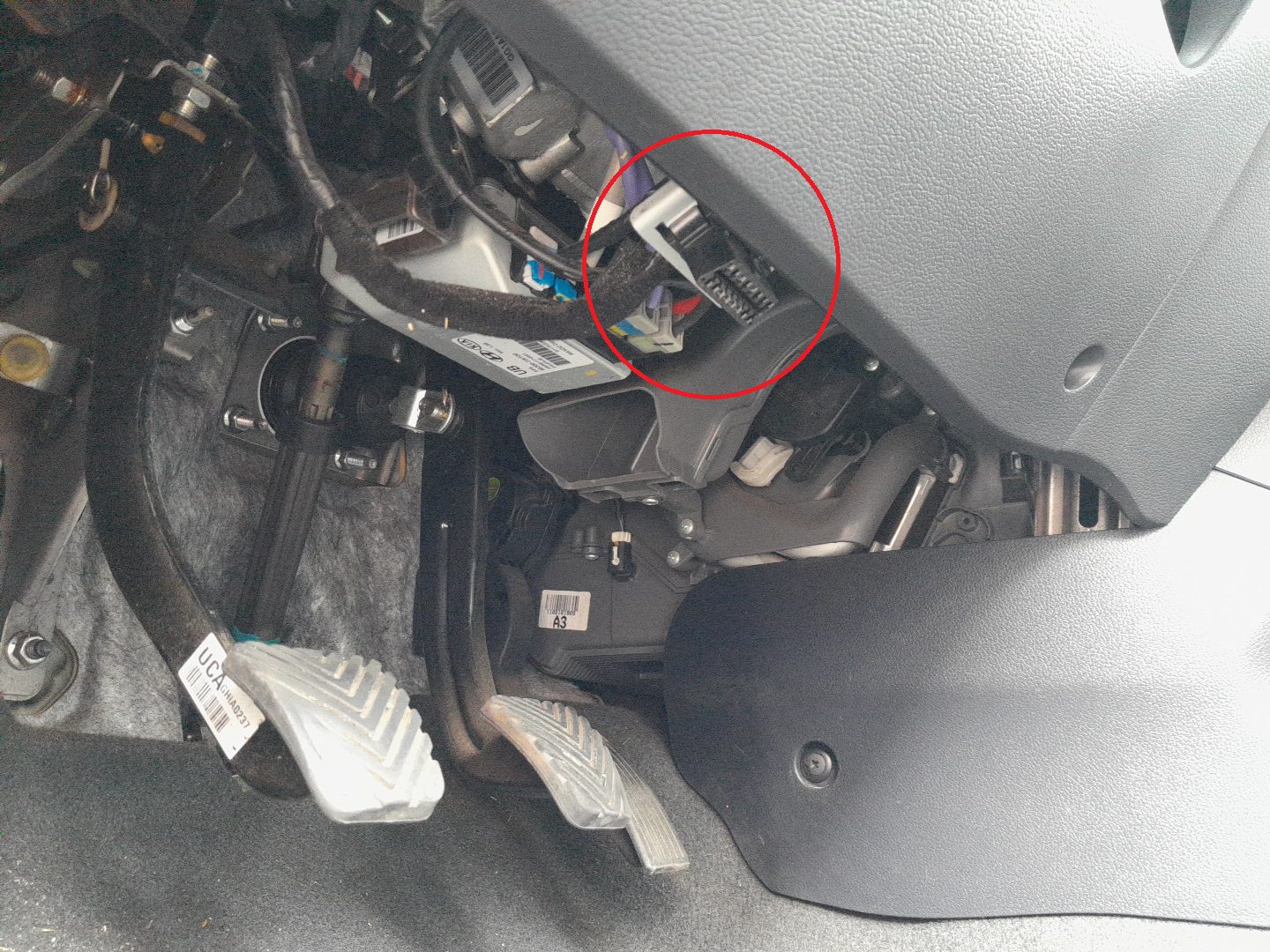
The diagnostic connector is located under the dashboard on the driver’s side, just above the brake pedal and to the left of the steering column. It sits behind a small plastic trim section integrated into the lower dash panel.
Before You Plug In
- Park the car, apply the handbrake, and have good light — a phone torch helps you see under the dash.
- Check the plug’s orientation before pushing it home; the connector is keyed and only fits one way.
- Have the ignition ready to switch on, but leave the engine off unless your tool asks otherwise.
- Keep hands clear of the pedals while you are reaching under the column.
How to Access the Connector
- Sit in the driver’s seat and look under the steering column toward the pedals.
- Locate the 16-pin trapezoidal connector facing downward or slightly toward the rear.
- If covered, gently pull open the small access panel or trim flap.
- Insert your diagnostic scanner’s plug — it only fits one way, so do not force it.
Tips for Safe Use
- Keep the ignition ON (engine off) when connecting a scan tool unless otherwise specified.
- Never connect or disconnect the tool during engine cranking.
- If the connector feels loose or misaligned, support it with your hand before inserting the plug.
- After diagnostics, ensure the connector is left uncovered but protected from dirt or moisture.
Recommended Tools
- Bluetooth or Wi-Fi OBD-II adapter compatible with Android/iOS apps such as Torque or Car Scanner.
- Professional handheld scanner for reading live data and clearing DTCs.
Frequently Asked Questions
Where is the OBD-II port on a 2011–2018 Kia Rio?
It is under the dashboard on the driver’s side, above the brake pedal and to the left of the steering column, set into the lower dash panel behind a small plastic trim flap. From the driver’s seat, look down and toward the pedals and you should see the 16-pin socket facing downward or slightly rearward.
Do I need to remove any trim to reach the connector?
No. The port is built to be reached without tools. At most there is a small access flap or trim cover you can gently pull open by hand. If yours is exposed already, you can plug straight in. Avoid prising at the surrounding dash panel — the socket is meant to be accessible as it sits.
Should the engine be running when I connect a scanner?
For most basic reading, switch the ignition to ON with the engine off, which powers the connector and modules without the engine turning. Never plug or unplug the tool while the engine is cranking, as the electrical spikes during starting are best avoided. Some live-data tests need the engine running, so follow your tool’s instructions.
Will any generic OBD-II adapter work on the Rio?
Yes. Because the port and its core communication pins are standardised, a generic Bluetooth or Wi-Fi adapter paired with an app like Torque or Car Scanner will read engine codes and live data on this Rio. A professional handheld scanner adds deeper access to other modules and more complete clearing of trouble codes.
Which pins carry power and data?
On the 16-pin connector, pin 16 supplies +12 V battery power, pins 4 and 5 are grounds, and pins 6 and 14 carry the CAN communication lines the Rio uses to talk to a scan tool. You do not need to probe these to use a reader — the plug is keyed so it only mates one way — but it helps when checking an adapter.
The port has power but my scanner won’t connect — what now?
Check the plug is fully seated and the ignition is on, then confirm your adapter is paired correctly in its app and set to the right protocol, usually automatic. A blown circuit feeding the port, or a cheap faulty adapter, can also be to blame. Try a second known-good tool before assuming the car’s wiring is at fault.
Once you have pulled a trouble code from the Rio’s port, the next question is what it actually means — our sister site autodtcs.com looks up OBD-II diagnostic codes and explains the likely causes in plain terms.
Independent guide — not affiliated with Kia. Always follow your official service manual and safety precautions. Read our full disclaimer.