These instructions apply to the Honda Civic Mk10 (FK) 2016-2021.
For other models, please choose your vehicle here.
Your Honda Civic Mk10 (FK, 2016–2021) has an idle-stop (auto stop/start) system that switches the engine off when you stop to save fuel. If you’d rather keep it running in traffic, there’s a button to turn it off. This is a normal comfort feature, not a fault — the light that appears when the engine cuts out simply confirms the system is doing its job. Below is how to switch it off, how it behaves on this Civic, and why it sometimes won’t cut the engine at all.
How Idle-Stop Works
Brake to a stop (CVT automatic) or stop, select neutral and release the clutch (manual), and the engine shuts off; lift the brake or dip the clutch and it restarts. It only operates once the engine is warm and the battery is healthy.
Behind the scenes the system is constantly checking a set of conditions before it will let the engine sleep. The 12 V battery must be holding enough charge, the coolant must be up to temperature, the cabin climate demand must be modest, and the car must be genuinely stationary with the brake held firmly (or the gearbox in neutral on a manual). If any one of those is not met, the Civic simply keeps idling — it never risks a stop it can’t recover from cleanly.
Getting Ready
- Have the engine running and the car safely stopped — you set this while stationary or moving, not with the ignition off.
- Know that whatever you choose applies to the current journey only; the setting is not stored.
- If you want the engine to actually auto-stop, give it a few minutes to warm up first — it stays disabled while cold.
- On a manual, remember the trigger is neutral with the clutch released; on the CVT it is a firm, full stop on the brake.
How to Switch It Off
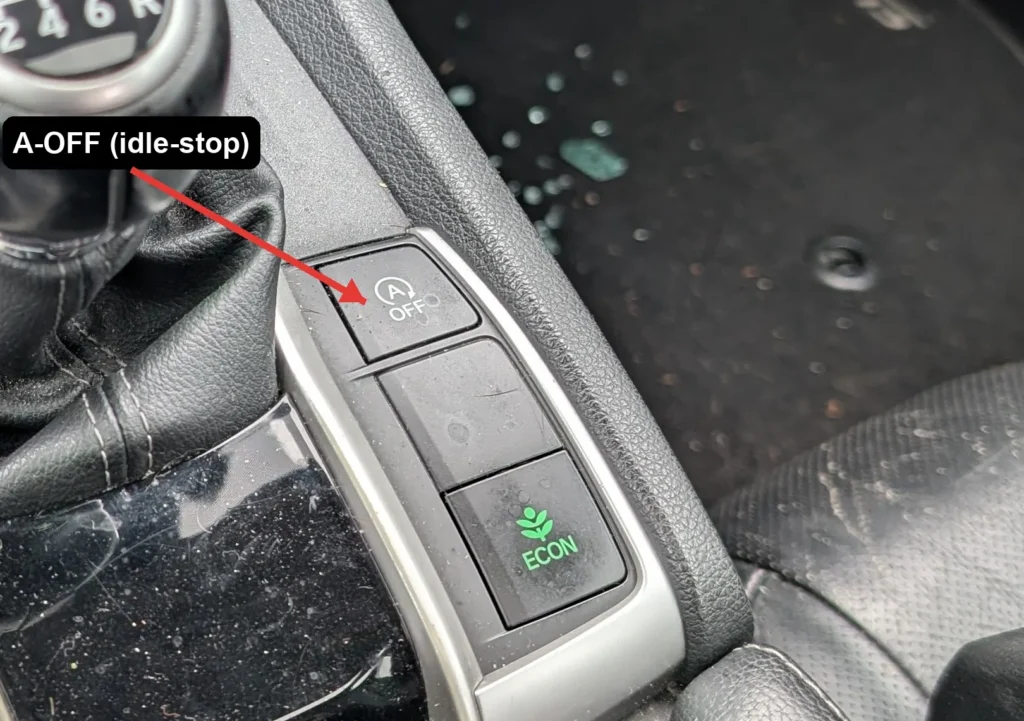
- With the engine running, press the idle-stop OFF button — an “A” with a circular arrow (auto-stop), usually low on the dash or near the gear selector.
- A dash light confirms idle-stop is off, and the engine idles normally at a stop.
How to Switch It Back On
Press the button again, or simply restart the car — idle-stop defaults back on every time you switch the ignition off and on.
If the Engine Won’t Auto-Stop
If you’ve left idle-stop enabled but the engine keeps idling at every halt, work through these before assuming a fault:
- Cold engine — the most common reason. The system stays out until the coolant reaches its normal operating temperature, so it rarely stops on the first mile or two of a cold start.
- Weak 12 V battery — if the battery is aged or hasn’t fully recharged after short trips, the Civic blocks idle-stop to protect starting ability. A charge or a battery test often restores it.
- Recent battery disconnect — after a battery change or reconnection the system may sit out for several longer drives until the charge management relearns the battery’s state.
- Strong climate demand — hard heating, cooling, or windscreen demist keeps the engine running so the cabin stays comfortable.
- Not fully stopped — creeping forward, a light brake press, or the wheel turned at a junction can all hold the engine on.
- Gradient — on a noticeable slope the system may decline to stop so the car doesn’t roll.
- Very hot or very cold ambient — extreme outside temperatures can suspend idle-stop entirely.
If it stopped working after a battery change, let the battery fully charge — see our Civic Mk10 battery guide.
What Happens Next
Once you’ve pressed the OFF button, the confirmation light stays lit and the engine will idle normally at every stop for the rest of that drive. Turn the ignition off and back on and idle-stop quietly returns to its default enabled state — there is no warning and nothing is wrong; the Civic is simply designed to prefer the fuel-saving mode each time you start.
Frequently Asked Questions
Does the Civic remember my idle-stop setting?
No. The Civic Mk10 resets idle-stop to on every time you switch the ignition off and back on, so you need to press the button again each journey if you want it disabled. There is no menu option or dealer setting to make the “off” state permanent — that behaviour is deliberate and shared by almost every car with this feature.
Is it bad to keep using idle-stop?
No. The Civic’s starter motor and battery are specified for the extra cycles, and the system will not stop the engine at all when the battery is low or conditions are unfavourable. Using it as intended saves fuel and reduces emissions in traffic without shortening the life of the driveline components.
Why won’t the engine auto-stop?
Most often a cold engine, a low or ageing 12 V battery, or the climate system demanding heating, cooling, or demist. Gradients, the steering being turned, and not coming to a complete stop will also keep the engine idling. Give the car time to warm up and the battery time to charge before treating it as a fault.
Does ECON affect it?
ECON changes throttle response and climate behaviour to favour economy, but idle-stop is controlled by its own dedicated button. Turning ECON on or off does not switch idle-stop on or off; the two systems work independently, though both are aimed at reducing fuel use.
A warning light stayed on after the engine restarted — is that normal?
The normal idle-stop indicator lights only while the engine is asleep and clears as it restarts. If a separate amber warning stays lit, that points to a fault — commonly a tired 12 V battery — rather than the ordinary stop/start indicator, and is worth investigating.
Can I stop the engine restarting while it’s auto-stopped?
Yes — lifting your foot slightly, opening the driver’s door, or unclipping the seatbelt will prompt the Civic to restart the engine for safety. If you plan to work in the engine bay, switch idle-stop off first and then turn the ignition off completely so there is no chance of an automatic restart.
If a warning light appeared alongside the fault, look up the code on autodtcs.com. To clear a service reminder, see our Civic Mk10 service reset guide.
Independent guide — not affiliated with Honda. Always follow your official service manual and safety precautions. Read our full disclaimer.