These instructions apply to the Hyundai i10 Mk1 (PA) 2008-2013.
For other models, please choose your vehicle here.
Some Hyundai i10 (PA, 2008–2013) models have Idle Stop & Go (ISG) — the fuel-saving system that switches the engine off when you stop and restarts it when you pull away. If you would rather it stayed running (in slow traffic, on a hill, or while the car warms up), you can turn it off with a single button.
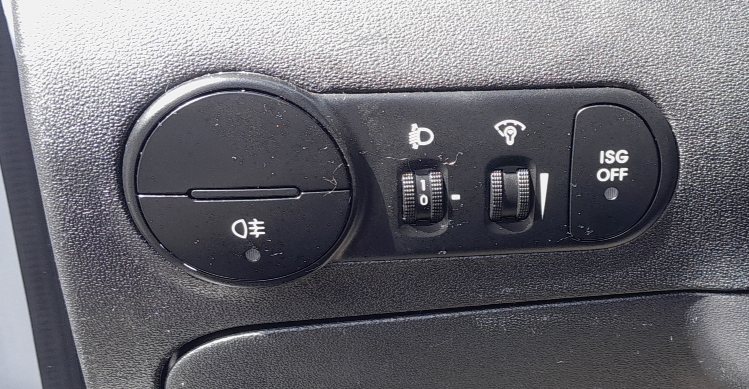
How ISG works
With ISG active, the engine stops when the car is stationary, in neutral, with your foot off the clutch. Dip the clutch and it restarts. It only operates once the engine is warm, the battery is well charged and the climate demand is low, so it will not always trigger — that is normal.
Turning ISG off
- Find the ‘ISG OFF’ button — it is on the switch panel to the right of the steering wheel, next to the headlight-levelling and instrument-dimmer dials.
- Press it once. A telltale in the button/cluster confirms ISG is now off, and the engine will no longer auto-stop.
Turning ISG back on
ISG does not stay off permanently. It re-enables itself automatically the next time you start the car — so it is on by default every journey. To switch it off again, press the ISG OFF button after each start. To turn it back on within the same drive, press the button again.
Frequently asked questions
Where is the ISG button on a Hyundai i10?
On the dashboard switch panel to the right of the steering wheel, marked ‘ISG OFF’, alongside the headlight-levelling and dash-brightness controls.
Does the ISG setting stay off after I switch the car off?
No. ISG resets to on every time you start the car. Press ISG OFF again if you want it disabled for that journey.
Why doesn’t my i10’s engine auto-stop even with ISG on?
ISG only works when conditions are met: engine warm, battery charged, not too much heating/cooling demand, and the car fully stopped in neutral with the clutch released. If any of these isn’t met, the engine keeps running.
Is it bad to leave ISG on?
No — the starter and battery are uprated for it. Many owners simply switch it off in stop-start traffic for smoothness, then let it default back on for economy.
If ISG stops working after a battery change, it usually returns once the battery recharges — see our i10 battery guide. For a stored warning, decode it on autodtcs.com.
Independent guide — not affiliated with Hyundai. Always follow your official service manual and safety precautions. Read our full disclaimer.