These instructions apply to the Mercedes Sprinter Mk3 (W907/W910) 2018-Present.
For other models, please choose your vehicle here.
The ECO start/stop system shuts the engine off when your Sprinter is stationary and restarts it as you pull away. If you dislike the constant stops in traffic or during loading, you can switch it off from the dashboard.
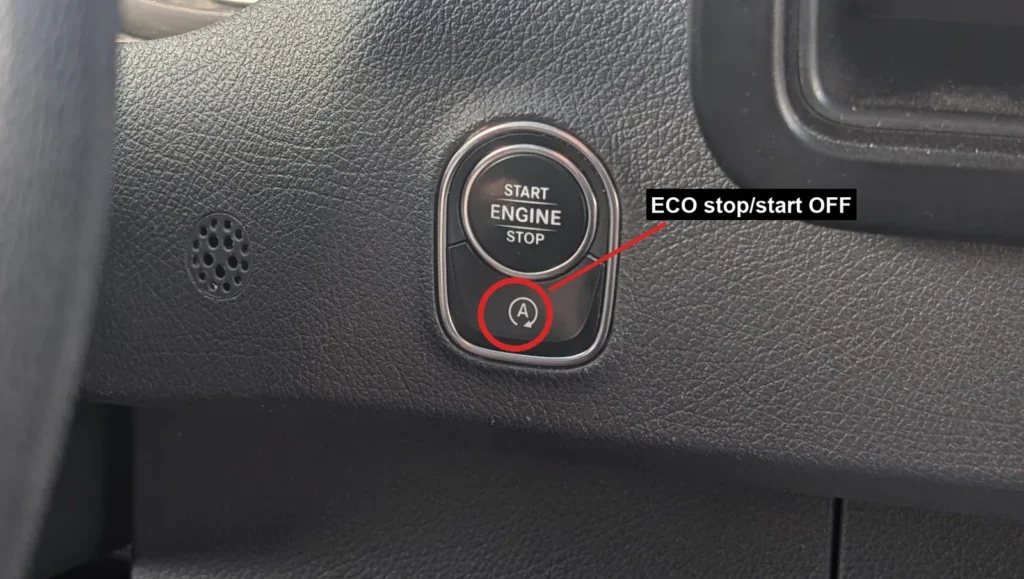
- With the van switched on, press the ECO start/stop button on the dashboard.
- Check the instrument cluster — the display changes to confirm the system is switched off.
- The system stays off until the next time you start the van. It re-enables automatically on every restart, so press the button again each drive if you want it to stay off.
Good to know
When the engine has auto-stopped, the cluster shows an ECO stop symbol. If the conditions for an auto-stop are not met, the cluster shows a different, crossed symbol instead.
On an automatic Sprinter, the engine auto-stops when you hold the van stationary in D or N. It restarts when you release the brake in D, select D or R, or press the accelerator.
There is no permanent “always off” setting — the system defaults back on every time you start the van.
FAQ
How do I permanently disable the Sprinter start/stop system?
You can’t. There is no permanent off switch — the system re-enables itself every time you start the van. Press the ECO start/stop button once at the beginning of each drive to keep it off for that trip.
Why does my engine keep shutting off at traffic lights?
That is the ECO start/stop system working normally. It switches the engine off while you are stationary to save fuel and restarts it when you move away. Press the ECO button to turn it off if you prefer.
Where is the ECO start/stop button?
It is on the dashboard, marked ECO or an A with a circular arrow around it. It sits among several similar-looking dash buttons, so check the icon before pressing.
Does turning it off harm anything?
No. Switching the system off has no ill effect on the engine or the van — it simply keeps the engine running while you are stationary.
Independent guide — not affiliated with Mercedes. Always follow your official service manual and safety precautions. Read our full disclaimer.