These instructions apply to the Nissan Qashqai Mk2 (J11) 2014-2021.
For other models, please choose your vehicle here.
The Nissan Qashqai J11 (2014–2021) resets its service indicator through the cluster menu — no tool needed. With the ignition on, use the steering-wheel scroll and OK buttons to go Settings → Maintenance → Service → Reset. Nissan changed the button layout with the June 2017 facelift, so pre- and post-facelift steps differ slightly; both are covered below.
When to Reset the Service Indicator
- After completing an oil and filter change.
- If the spanner / wrench symbol with “Service due” or “Maintenance” appears on the centre display at startup.
- If you bought the Qashqai second-hand and the previous owner never cleared the indicator.
⚠️ On the J11 Qashqai the service indicator tracks the oil-change distance counter only. Brake fluid (every 2 years), CVT fluid (every 60,000 miles on Xtronic-equipped trims), and the rest of the service schedule aren’t tracked by the cluster — those follow the printed service schedule.
Before You Begin
- Park on a level surface with the engine off and the handbrake on. Complete the actual oil and filter change before the reset.
- Identify which version your J11 is. Look at the build plate (driver’s door shut), or check the production month: anything built up to May 2017 uses Method 1; anything built from June 2017 onwards uses Method 2. Externally the facelift is easy to spot — the post-2017 cars have the redesigned V-Motion grille and the LED daytime-running-light signature.
- Locate the steering-wheel buttons: pre-facelift cars have the buttons grouped on the left spoke; post-facelift cars added a dedicated horizontal-arrows rocker (button 3) on the right spoke for sub-list navigation.
What You’ll Need
None for the reset itself. For the oil change you’ll need fresh Nissan-spec oil — 5W-30 ACEA C4 / Nissan Genuine 5W-30 (Strata) for the 1.6 dCi diesel, 5W-30 ACEA C2 / C3 for the 1.5 dCi and the 1.2/1.3 DiG-T petrol engines — a new spin-on filter (different parts for 1.2 vs 1.6 dCi), a 17 mm sump-plug socket (1.6 dCi) or 14 mm (1.2/1.3 DiG-T), and a torque wrench rated to about 35 Nm (sump plug, 1.6 dCi) or 25 Nm (DiG-T).
How to Reset the Service Light on the Nissan Qashqai (Pre-Facelift, to May 2017)
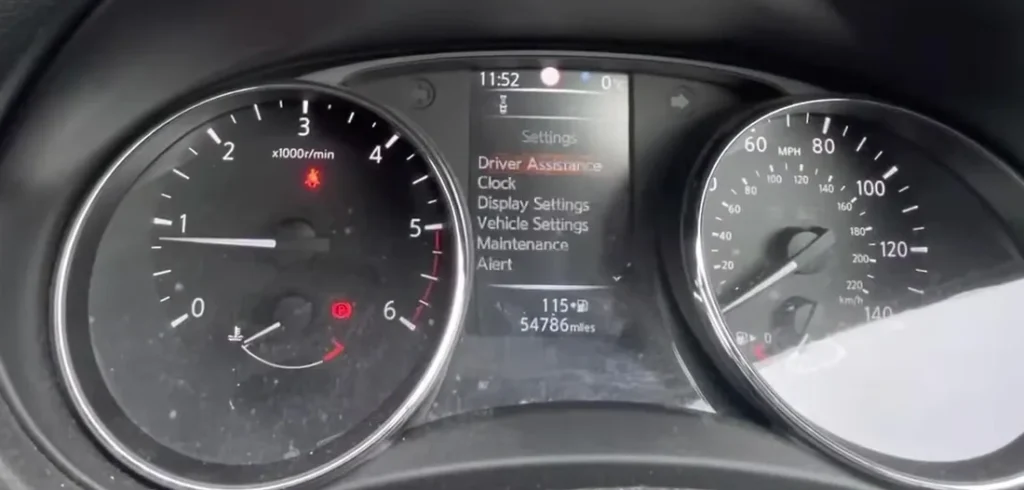
- Turn the ignition ON with the engine off. On push-button-start trims, press START/STOP twice without your foot on the brake — this takes you through ACC to full IGNITION ON without cranking.
- Wait a couple of seconds for the cluster to fully wake and the central display to settle on the default vehicle information screen.
- Using the cluster scroll button (button 1) on the left steering-wheel spoke, press repeatedly to scroll through the menu list until “SETTINGS” is highlighted.
- Press the OK / enter button (button 2) on the same spoke to confirm and enter the Settings menu.
- Press button 1 repeatedly again to scroll within Settings. Highlight “MAINTENANCE”.
- Press button 2 to enter Maintenance.
- Press button 1 to scroll. Highlight “SERVICE”.
- Press button 2 to enter.
- Press button 1 to scroll. Highlight “RESET”.
- Press button 2 to confirm. The display reports the system has been reset.
- Switch the ignition off to exit.
Method 2 — J11 Facelift (Production from June 2017)
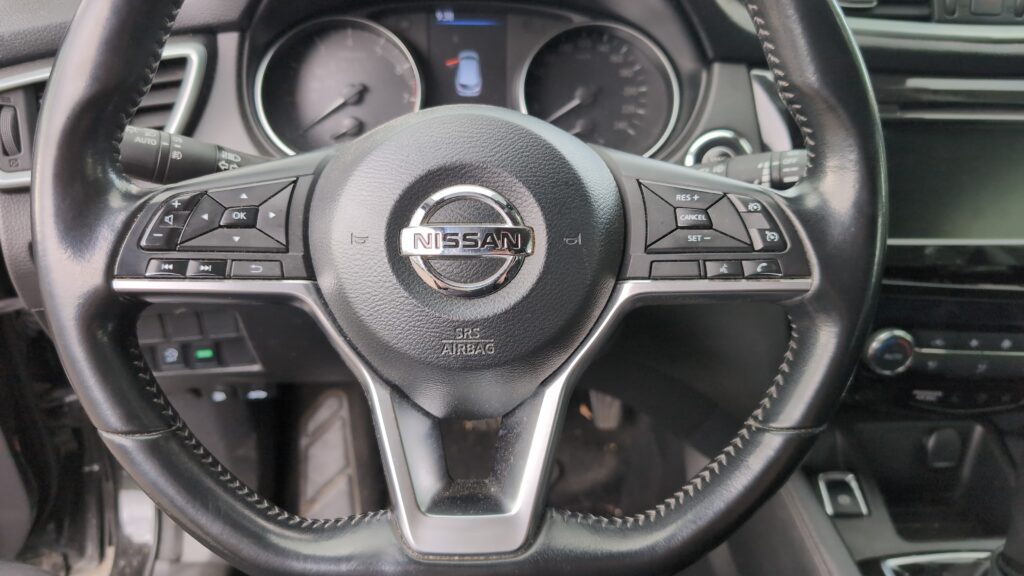
The facelift added a horizontal-arrows rocker (button 3) on the right steering-wheel spoke for sub-list navigation. The top-level menu is still driven by button 1; everything inside a sub-menu is driven by button 3; OK is still button 2.
- Turn the ignition ON with the engine off.
- Wait for the cluster to wake. Default vehicle-information screen should be showing.
- Press button 1 (left spoke, top scroll) repeatedly. Highlight “SETTINGS”.
- Press button 2 (OK) to enter Settings.
- Press button 3 (right spoke, sub-list scroll) repeatedly. Highlight “MAINTENANCE”.
- Press button 2 to enter Maintenance.
- Press button 3 to scroll. Highlight “SERVICE”.
- Press button 2 to enter.
- Press button 3 to scroll. Highlight “RESET”.
- Press button 2 to confirm.
- The procedure is complete when “—“ appears on the cluster display.
- Switch the ignition off.
Verify the Reset Worked
Switch the ignition off, wait 30 seconds, and cycle back on. The spanner / wrench warning at startup should be gone. The Service Maintenance screen (Settings → Maintenance → Service) should now show the new full interval — typically 12,500 miles (20,000 km) or 12 months for European-market 1.2 DiG-T / 1.5 dCi cars, and the same interval for the 1.6 dCi diesel. Some early UK J11 1.2 DiG-T cars use a shorter 9,000 miles (15,000 km) default — that’s normal.
If Something Goes Wrong
- Menu doesn’t appear when I press the scroll button. The cluster is at ACC instead of full IGNITION ON. On key-start cars, turn the key one extra notch (position II). On push-button-start cars, press the button a second time without a foot on the brake.
- I’m on the right menu but RESET doesn’t confirm. The Service menu only shows the RESET option when an oil-change service is actually due (i.e., the remaining distance is below the trigger threshold, typically when there’s less than 600 miles / 1,000 km remaining). If you’re trying to “pre-reset” a car that still has plenty of service distance left, the option simply isn’t shown. Drive a few hundred miles and try again — or, if the indicator was already showing, the option should be present.
- Reset works but the spanner warning comes back after a few miles. Battery condition is the usual cause on J11 Qashqai. The cluster EEPROM commits the new value, but a voltage brownout during cranking corrupts it on a tired battery. Load-test and replace the 12V battery if it’s older than 4-5 years (the J11 has a notably high-draw infotainment system that ages batteries faster than average).
- I have a J11 Tekna with the colour 7-inch TFT — does it use a different reset? No. The Tekna / Tekna+ trim adds a colour TFT in place of the monochrome central display, but the menu structure and steering-wheel button layout are identical to lower trims of the same production year. Use the same procedure based on facelift status.
- Reset works on my J11 but not on my partner’s 2017 J11. If the second car is built in or after June 2017, it’s a facelift car and uses Method 2 (button 3 for sub-list scrolling). Following Method 1 on a facelift car will get you to SETTINGS but the sub-list scroll will fail because button 1 stops working for sub-menus.
- My J11 is a CVT Xtronic-equipped variant — does the procedure differ? No. The reset is independent of transmission type. The CVT does have its own fluid-change interval at 60,000 miles, but that’s not tracked by the service indicator and has to be done by a Nissan dealer (or with a scan tool to clear the workshop counter afterwards).
Frequently Asked Questions
What does the spanner symbol on the Qashqai mean?
On the J11 it’s the oil-change service reminder. It illuminates when the service-distance counter drops to zero. The icon is purely a maintenance reminder — it does not indicate an engine fault. If the orange Master Warning lamp is also lit alongside the spanner, that’s a separate issue and needs a scan tool to read the body-control codes.
What’s the official Nissan service interval for a J11 Qashqai?
Nissan’s UK-market schedule for the J11:
- 1.2 DiG-T petrol: 12,500 miles (20,000 km) or 12 months.
- 1.3 DiG-T petrol (post-2018): 12,500 miles (20,000 km) or 12 months.
- 1.5 dCi diesel: 18,000 miles (30,000 km) or 24 months.
- 1.6 dCi diesel: 18,000 miles (30,000 km) or 24 months.
Severe-service / short-trip driving in the city: Nissan recommends halving the interval. The cluster doesn’t track conditions automatically.
Does the reset clear engine fault codes?
No. The reset zeros the service counter only. Engine fault codes are stored in the engine ECU and need a scan tool. For DTC interpretation see autodtcs.com.
What about the Qashqai J12 (2021 onwards)?
The J12 uses the NissanConnect / new digital cluster and the procedure moves to: Vehicle Settings → Maintenance → Engine Oil → Reset (driven from the central infotainment touchscreen rather than steering-wheel buttons). Different menu path, similar logic. We’ll publish a dedicated J12 guide.
And the J10 (2007–2013)?
The first-generation Qashqai J10 uses an older cluster with a steering-wheel-button procedure that’s broadly similar but lacks the “Settings → Maintenance” wrapper — it goes straight to the service screen. Different menu structure — see our forthcoming J10 guide.
I have a Renault Kadjar from the same era — is the procedure similar?
The Renault Kadjar (2015–2022) shares the J11’s CMF platform, engines, and a closely related cluster. The menu paths look familiar but the menu labels are in Renault terminology (“Vehicle settings” rather than “Settings”, “Maintenance / Service” combined) and the button mapping is slightly different. We’ll publish a dedicated Kadjar guide.
Will the J11 reset work on a 4WD ALL MODE 4×4-i variant?
Yes. The drivetrain mode doesn’t affect the cluster reset path. The 4WD selector adds menu entries elsewhere but doesn’t change the maintenance reset.
For DTC code interpretation on Nissan vehicles see autodtcs.com.
Independent guide — not affiliated with Nissan. Always follow your official service manual and safety precautions. Read our full disclaimer.