These instructions apply to the Vauxhall Astra Mk7 (K/B16) 2015-2021.
For other models, please choose your vehicle here.
When the spanner or “Service” / oil-life message appears on your Vauxhall Astra K (Mk7, 2015–2021) — sold as the Opel Astra elsewhere in Europe — the Oil Life System has counted down and an oil change is due. Reset it from the driver-information menu using the stalk buttons and the brake pedal; no garage tool is needed. Do the oil and filter change first, then clear the counter.
Before you start
- Reset only once fresh oil and a filter are in, or the system will under-estimate the next interval.
- Ignition on, engine off — you do not start the engine for this reset.
- No tools needed — you use the stalk MENU button and the brake pedal.
How to Reset the Astra K Service Indicator
- Turn the ignition on (engine off).
- Press ‘MENU’ on the indicator stalk and scroll to ‘Vehicle Information’; press to open it.
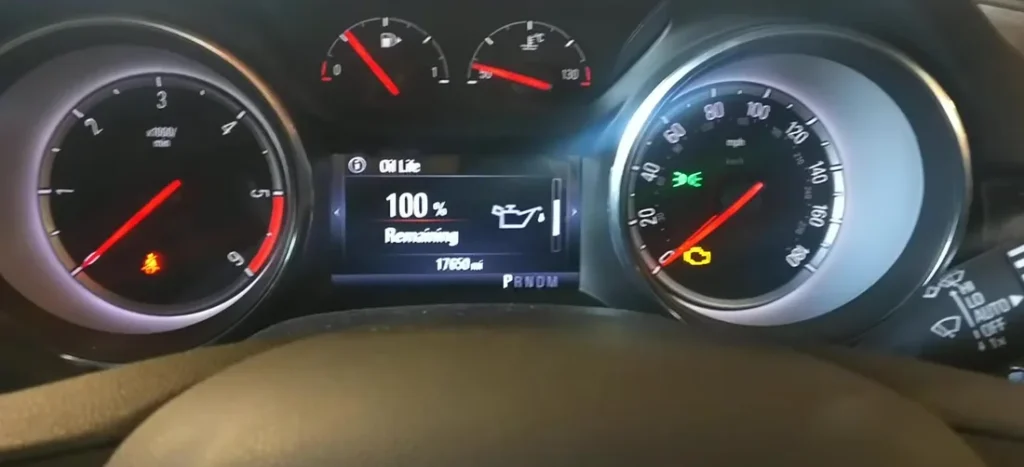
- Scroll to ‘Oil Life System’ (remaining oil life).
- Press and hold the menu button AND the brake pedal together for about 3 seconds.
- The oil life returns to 100% — the reset is done. Turn the ignition off.
Seeing the oil life jump back to 100% is your confirmation. If it still shows a low figure, the hold didn’t register — try again.
If It Doesn’t Reset
Almost every failed reset on the Astra K comes down to the button-and-pedal timing. Work through these:
- You didn’t hold both together — the menu button and the brake pedal must be pressed at the same time and held for a full ~3 seconds until the value returns to 100%.
- You weren’t on the Oil Life screen — the hold only works while the Oil Life System page is shown, not on any other Vehicle Information item.
- The engine was running — do the reset with the ignition on and the engine off.
- Cycle the ignition and repeat — switch fully off, wait a few seconds, turn back on, return to the Oil Life screen and hold again.
- A different warning is lit — that’s a fault, not the oil-life counter, and it won’t clear this way.
Frequently Asked Questions
How do I reset the service light on a Vauxhall Astra K?
Turn the ignition on, open Menu → Vehicle Information → Oil Life System, then press and hold the menu button and the brake pedal together for about 3 seconds until the oil life returns to 100%.
Is the Opel Astra the same?
Yes — the Astra K is sold as the Opel Astra in much of Europe and uses the identical Oil Life System and reset method.
What does the brake pedal have to do with it?
The Astra K requires the brake pedal held together with the menu button as a deliberate two-action confirmation, so the counter can’t be reset by accident while browsing the menu.
The message came back — why?
The button-and-brake hold didn’t register, so the counter never reached 100%. Repeat the hold on the Oil Life screen until the value shows 100%.
Is this the same as the oil change light reset?
Yes. The Astra’s service (InSP) reminder is tied to the oil-change interval, so this dash reset is what owners also search for as the oil change light reset.
If a warning light appeared with the service message, look it up on autodtcs.com. After battery work, see our Astra K battery guide.
Independent guide — not affiliated with Vauxhall. Always follow your official service manual and safety precautions. Read our full disclaimer.