These instructions apply to the Toyota Yaris Mk3 (XP130/P13) 2011-2020.
For other models, please choose your vehicle here.
The Toyota Yaris XP130 (P13, 2011–2020) — the third-generation Yaris hatchback, sold across Europe in petrol, diesel and full-hybrid forms and built in Valenciennes (France) for European markets — uses one of three different reset paths depending on the trim’s instrument cluster. There’s no diagnostic tool needed, but the right procedure depends on which display your XP130 has:
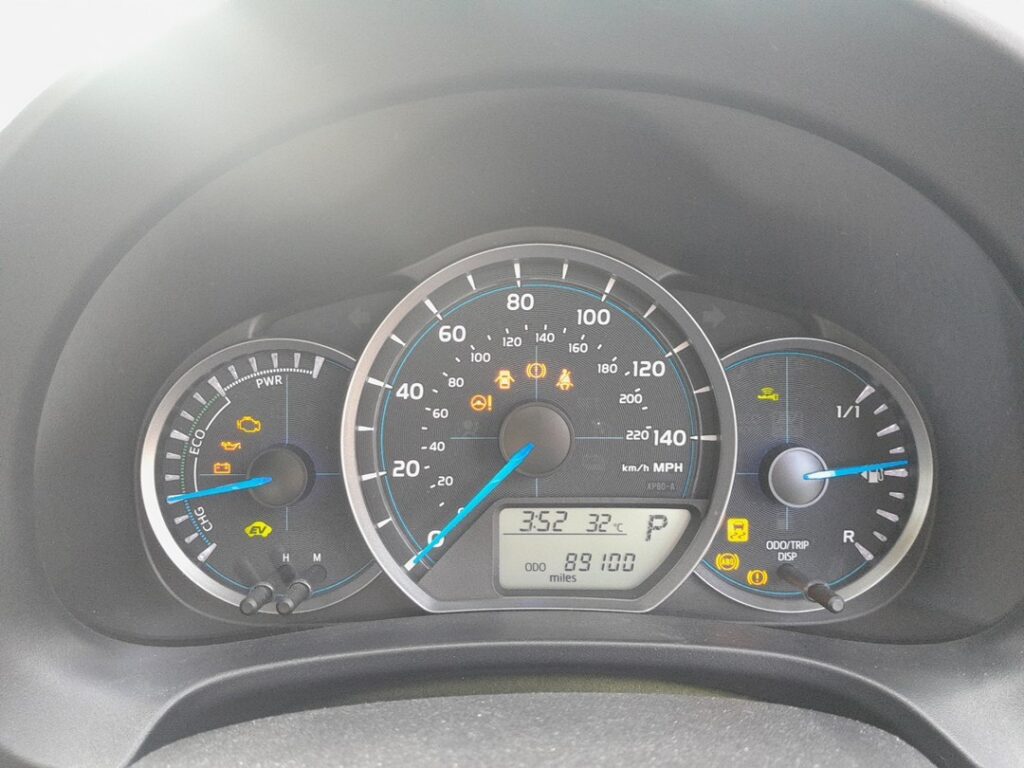
- Monochrome information display — basic Active / Icon trims. Uses the trip-recorder button + ignition-key combination.
- Colour information display — Sport / Excel and most facelift cars. Uses the TRIP button + ignition cycle on a flashing odometer.
- Touchscreen display — top-spec Excel Premium / Hybrid Excel facelift trims with the central 7-inch Toyota Touch 2 screen. Uses a menu path through Applications → Maintenance.
When to Reset the Service Indicator
- After completing an oil and filter change.
- If the wrench / spanner symbol with “Maintenance Required” appears at startup.
- If you bought the Yaris second-hand and the previous owner didn’t clear the indicator.
⚠️ On the XP130 Yaris the service indicator refers only to oil change — Toyota is explicit about this. Brake fluid (every 2 years), coolant (every 10 years / 240,000 km on Long Life Coolant), and other service items aren’t tracked by the cluster.
Before You Start
- Park on a level surface with the engine off. Complete the actual oil and filter change before the reset.
- Identify your information display by looking at the centre of the instrument cluster:
- Plain black-and-white text on an LCD strip = monochrome — use Method 1.
- Colour graphics with TFT-style icons (typical on 2014+ Excel / Sport / Hybrid) = colour — use Method 2.
- Centre-stack 7-inch touchscreen running Toyota Touch 2 with a “Car” application = touchscreen — use Method 3.
- Keyless / Smart Key cars only: the procedure explicitly says do not press the clutch or brake pedal during reset. On push-button-start trims, pedal presses crank the engine — keep both feet on the floor.
Tools and Supplies
None for the reset itself. For the oil change: fresh Toyota-spec oil — 0W-20 ACEA C2 / Toyota Genuine Motor Oil 0W-20 for the 1.0 VVT-i (1KR-FE) and the 1.33 Dual VVT-i (1NR-FE) petrol engines and the 1.5 Hybrid (1NZ-FXE), 5W-30 ACEA C2 / C3 for the 1.4 D-4D diesel; a new spin-on filter (different parts per engine); a 14 mm sump-plug socket (petrol) or 17 mm (D-4D); torque about 30 Nm (petrol sump plug) or 40 Nm (D-4D).
Method 1 — Monochrome Information Display (Basic Trim, Active / Icon)
Key-Start Cars (Without Smart Key)
- Turn the ignition ON (key position II, engine off).
- Press the trip-recorder button repeatedly to cycle the odometer display readout.
- Stop on TRIP A on the display.
- Turn the ignition OFF.
- Press and hold the trip-recorder button.
- While still holding the button, turn the ignition ON again.
- Wait until “—-“ appears on the display.
- Continue to hold the button. A countdown begins.
- Wait until the display shows “000000”.
- Release the button. The service indicator is reset.
- Switch the ignition off.
Smart Key / Push-Button-Start Cars
- Press the START/STOP button twice (without a foot on the brake or clutch) — this puts the car into IGNITION ON without cranking.
- Press the trip-recorder button repeatedly.
- Stop on TRIP A.
- Press the START/STOP button once to switch the ignition off.
- Press and hold the trip-recorder button.
- While still holding it, press the START/STOP button twice to turn the ignition back on (still no pedal pressed).
- Wait until “—-“ appears.
- Keep the button held through the countdown.
- Wait until the display shows “000000”.
- Release the button. Reset complete.
Method 2 — Colour Information Display (Sport, Excel, Most Facelift Cars)
Key-Start Cars
- Turn the ignition ON.
- Use the TRIP button on the multifunction steering wheel to scroll through the menu.
- Stop when the display shows “ODO” (odometer).
- Turn the ignition OFF.
- Press and hold the TRIP button.
- Turn the ignition ON.
- The odometer reading starts flashing.
- Continue to hold the TRIP button.
- Release the button when the odometer reading stops flashing.
- Reset complete. Switch the ignition off.
Smart Key / Push-Button-Start Cars
- Press the START/STOP button twice (no foot on pedals).
- Use the TRIP button to scroll until “ODO” is shown.
- Press the START/STOP button once to switch off.
- Press and hold the TRIP button.
- Press the START/STOP button twice to ignition-on again.
- The odometer flashes.
- Keep the TRIP button held.
- Release when the odometer reading stops flashing. Reset complete.
Method 3 — Touchscreen Display (Excel Premium, Top-Spec Hybrid)
If your XP130 has the central 7-inch Toyota Touch 2 screen, the reset is menu-driven and much simpler:
- Turn the ignition ON.
- On the central touchscreen, tap “Applications”.
- Tap “MAINTENANCE”.
- Tap “Scheduled”.
- Tap “RESET”.
- The procedure is complete.
Verify the Reset Worked
Switch the ignition off, wait 30 seconds, then cycle ignition back on. The maintenance-key / spanner warning at startup should be gone. The next-service distance readout on the trip computer (or in the MAINTENANCE app on touchscreen trims) should show a fresh full interval — typically 10,000 miles (15,000 km) or 12 months for European-spec XP130 petrol and diesel cars, or 9,000 miles (15,000 km) or 12 months for the Yaris Hybrid (slightly different due to the hybrid system’s separate engine-life algorithm).
Troubleshooting
- I’m pressing the trip button but the countdown doesn’t start. The procedure on the XP130 requires the button to be pressed and held before the ignition is turned on — not after. Start with ignition off and the button already held, then turn the key. If you press the button after the cluster has already woken up, the reset path doesn’t open.
- On a Smart Key XP130, the engine cranks when I press START/STOP. Your foot is on the clutch (manual) or brake (automatic). Move both feet to the floor, then press START/STOP. The button only cranks with a pedal pressure.
- The odometer flashes but doesn’t stop. The XP130 colour-display reset only commits when you keep the TRIP button held through the entire flash period. If you release too early, the flash continues and the reset doesn’t take. Hold for the full duration (around 10 seconds).
- I have a Yaris Hybrid — same procedure? Yes. The XP130 Yaris Hybrid uses the same cluster and the same reset procedure as petrol / diesel variants. Pick the method that matches your specific display type (monochrome / colour / touchscreen). The hybrid system’s separate “ready” state doesn’t affect the reset.
- Toyota Touch 2 doesn’t have a MAINTENANCE app. The MAINTENANCE app only appears on the 2014+ facelift XP130 trims that shipped with Toyota Touch 2 firmware version 2.0 or later. Pre-2014 cars with the older Touch (v1) don’t have this app — use Method 1 or Method 2 based on cluster type instead.
- Reset works, but the spanner symbol returns after a long drive. Cluster EEPROM didn’t commit. The XP130 cluster is generally robust, but a marginal 12V battery causes intermittent commit failures. Load-test if the battery is older than 5 years.
Frequently Asked Questions
What does the spanner symbol on the Toyota Yaris mean?
On the XP130 Yaris the spanner / wrench icon is the oil-change reminder. It’s a pure mileage timer — Toyota’s documentation explicitly says it “refers only to oil change.” It does not indicate an engine fault or any other service item. If the orange check-engine light (an engine-outline icon — different shape) is on, that’s a separate ECU fault that needs a scan tool.
How often does the XP130 Yaris service indicator come up?
Toyota’s official European-market schedule for the XP130:
- 1.0 VVT-i petrol (1KR-FE): 10,000 miles (15,000 km) or 12 months.
- 1.33 Dual VVT-i petrol (1NR-FE): 10,000 miles (15,000 km) or 12 months.
- 1.4 D-4D diesel: 10,000 miles (15,000 km) or 12 months.
- 1.5 Hybrid (1NZ-FXE): 9,000 miles (15,000 km) or 12 months.
UK severe-service / short-trip driving typically halves the interval to 5,000 miles / 6 months. The cluster doesn’t auto-adjust to driving conditions — apply the shorter interval manually.
Does the reset clear engine fault codes?
No. The reset zeros the maintenance counter only. Engine codes (P0xxx) need a scan tool. For DTC interpretation see autodtcs.com.
Will this work on the Toyota Auris from the same era?
The Toyota Auris E15 (2006–2014) uses the same monochrome-cluster approach with the trip-button-and-ignition method. Different cluster details, similar logic — see the Auris guide. The Auris E18 (post-2012 facelift) is similar to the XP130 Yaris colour-display path.
What about the next-gen Yaris (XP210, 2020+)?
The fourth-generation Yaris (XP210 / P21, 2020 onwards) uses the all-digital 4.2-inch cluster and a menu path through the multi-information display: Settings → Maintenance → Reset. Different procedure — see our forthcoming XP210 guide.
And the previous-gen Yaris (XP90, 2005–2013)?
The second-generation Yaris XP90 uses a simpler trip-button-only sequence with no menu navigation — different procedure. See our forthcoming XP90 guide.
I drive a Yaris GRMN (2018) — same procedure?
The Yaris GRMN (the 1.8-litre supercharged hot hatch built on the XP130 platform, 2018 only, very limited production) uses a slightly modified cluster with sportier graphics but the same reset logic as the standard XP130 colour-display. Use Method 2.
For DTC code interpretation on Toyota vehicles see autodtcs.com.
Independent guide — not affiliated with Toyota. Always follow your official service manual and safety precautions. Read our full disclaimer.