These instructions apply to the Skoda Octavia Mk4 (NX) 2020-Present.
For other models, please choose your vehicle here.
Your Skoda Octavia Mk4 (NX, 2020–present) has a Start/Stop system that switches the engine off when you stop, to save fuel. It’s easy to turn off when you’d rather keep the engine running — here’s how, why it sometimes won’t engage, and how to make it stick.
How It Works on the Octavia
Stop with the car in neutral and the clutch up (manual) or on the brake (DSG) and the engine cuts; press the clutch or release the brake and it restarts. It only operates once the engine is warm and the battery is healthy. The eTSI mild-hybrid versions restart especially smoothly via the belt starter-generator.
How to Switch It Off
Unlike the older Octavia, the Mk4 has no dedicated “A” start/stop button — you switch the system off on the central touchscreen. The quickest way, as described in the owner’s manual:
- Press the vehicle button on the panel below the touchscreen to open the vehicle quick-menu on screen.
- Tap the Start/Stop tile. A green “A OFF” icon appears and the dash telltale lights to confirm start/stop is off for this drive.
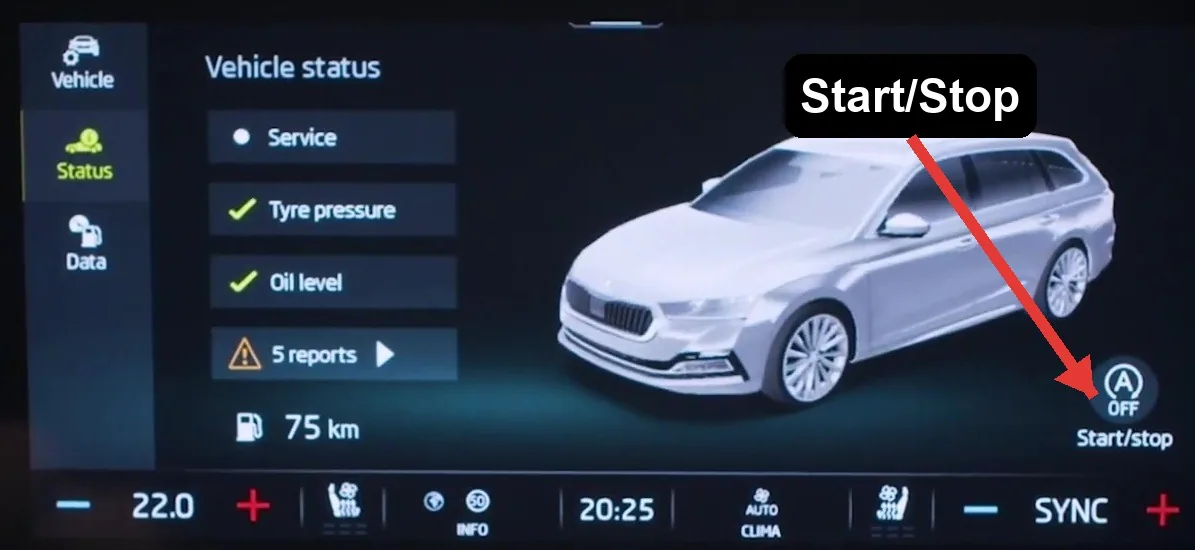
You can also reach the same toggle through the menu — tap Vehicle › Status on the home screen, then tap the Start/Stop tile on the Vehicle status screen (shown above). Either way, it switches off only for the current drive.
How to Switch It Back On
Tap the Start/Stop tile again, or simply restart the car — Start/Stop defaults back on every time you switch the ignition off and on.
Making It Permanently Off
The on-screen toggle only lasts for the current drive. To have the car remember “off”, the behavior can be coded with OBDeleven or VCDS (or at a specialist) — a popular, reversible change on VW-Group cars.
Why It Sometimes Won’t Activate
- The engine isn’t warm yet, or the climate system is demanding heating, cooling, or demisting.
- The battery charge is low — common after short trips or a battery change; auto-stop is blocked to protect the battery.
- You’re on a slope, the steering is turned, or you haven’t fully stopped.
Frequently Asked Questions
Does the Octavia remember my Start/Stop setting?
No — it resets to on each start. A permanent change needs coding (OBDeleven/VCDS).
Is it bad to keep using Start/Stop?
No — the Octavia’s reinforced starter and AGM/EFB battery are built for it, and it skips stops when the battery is low.
Why did it stop working after a new battery?
A new battery should be registered so the system trusts its charge state; until then (or until it charges) auto-stop may stay off.
Will coding it off cause problems?
No — it’s a reversible comfort setting many owners apply.
If a warning light appeared alongside the fault, look up the code on autodtcs.com. To clear a service reminder, see our Octavia Mk4 service reset guide.
Independent guide — not affiliated with Skoda. Always follow your official service manual and safety precautions. Read our full disclaimer.