These instructions apply to the Dodge Charger Mk6 (LX) 2006-2010.
For other models, please choose your vehicle here.
The Charger’s Personal Settings menu — Chrysler’s name for the customer-programmable features — lives in the EVIC trip computer and lets you tailor how the car locks, lights and behaves. It only opens with the transmission in Park, so you set it once in the driveway and forget it. Everything is driven from the MENU button and the steering-wheel scroll and select buttons.
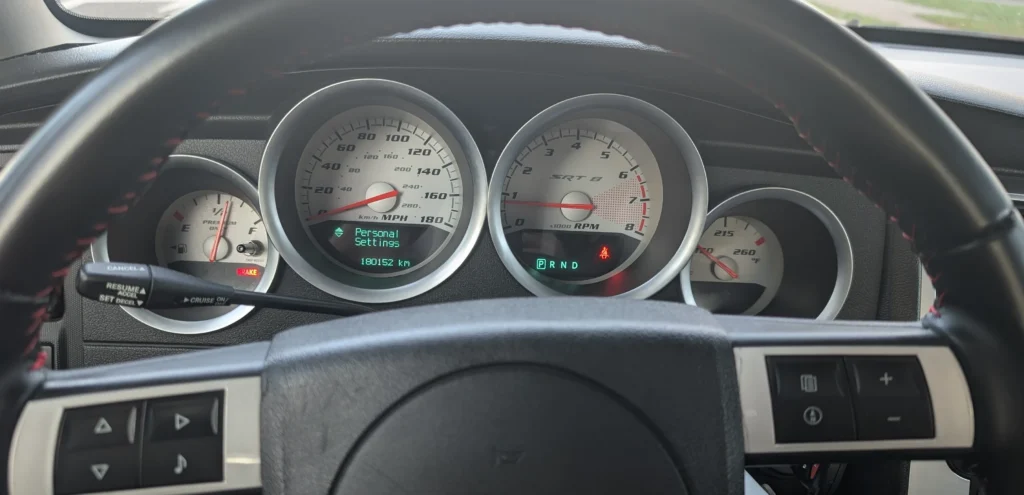
How you get into it
On a Charger the EVIC is the small display between the speedometer and tachometer, and it’s controlled entirely from the steering-wheel switches, not a touchscreen. Tapping MENU cycles the top-level headings; the up/down (scroll) buttons move through the choices, and the select button commits a change. If nothing scrolls up, the car almost certainly isn’t in Park — the menu is locked out in every other gear as a distraction-prevention measure.
You will need the EVIC: these menus run on the Electronic Vehicle Information Center — the driver-information display between the gauges — and its steering-wheel menu buttons. It is standard on higher trims (R/T, SRT8, Limited) and optional on base models; a base car without the EVIC has no Personal Settings menu to change.
- Shift into Park and turn the ignition to On.
- Press and release the MENU button repeatedly until “Personal Settings” appears in the EVIC.
- Use the steering-wheel up/down (scroll) buttons to highlight a feature, then press the select button to change its value.
Depending on trim, the Charger exposes settings such as:
- Display language
- English or metric units
- Auto-lock the doors at 15 mph (on/off)
- Auto-unlock on exit
- Remote unlock: driver’s door first or all doors
- Recall memory position with remote unlock
- Sound the horn on remote lock
- Headlamp-off delay: 0, 30, 60 or 90 seconds
- Headlamps on with wipers
- Rain-sensing wipers
- Auto seat-back move on exit
- Tilt mirrors down in reverse
- Illuminated approach / accessory delay
- Flash headlamps with remote lock/unlock
Why your list may differ
The menu only shows options the car actually has, so a base SE or SXT won’t list memory-seat, park-assist or navigation items that a loaded R/T or SRT8 carries — that’s normal, not a fault. Values are stored the moment you change them; there’s no separate save step, so once the readout looks right you simply drive off.
If it doesn’t behave
If “Personal Settings” never appears, confirm the shifter is fully in Park and the ignition is in On (not just Accessory). A menu that freezes or resets by itself — especially alongside a flickering EVIC after a battery disconnect — usually clears after one full ignition cycle; if it doesn’t, the cluster or the steering-wheel switch pack can develop a fault worth reading with a scan tool. Set anything safety-related (auto-lock, headlamp delay) parked, not on the move.
Independent guide — not affiliated with Dodge. Always follow your official service manual and safety precautions. Read our full disclaimer.